I love mechanical desk toys. Newton’s cradles, kinetic sand timers, those little drinking-bird things. They all share the same defect: they don’t know anything about what I’m doing on my computer. The cradle clicks at the same pace whether I’m in flow, in a meeting, or away from the desk. The whole point of a desk toy is to be for the desk, and yet none of mine had any opinion about the actual work happening on it.
So I built one that does.
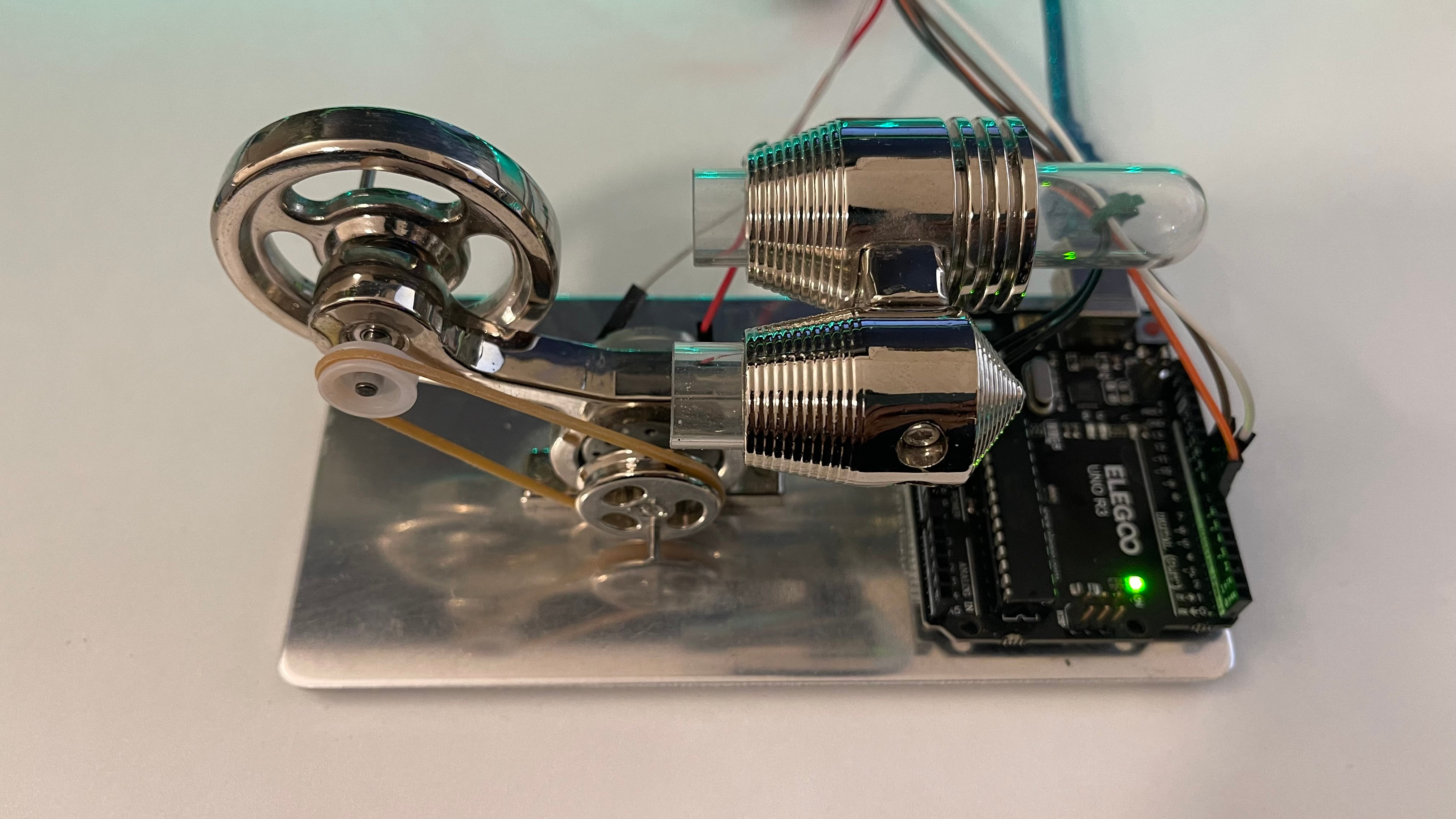
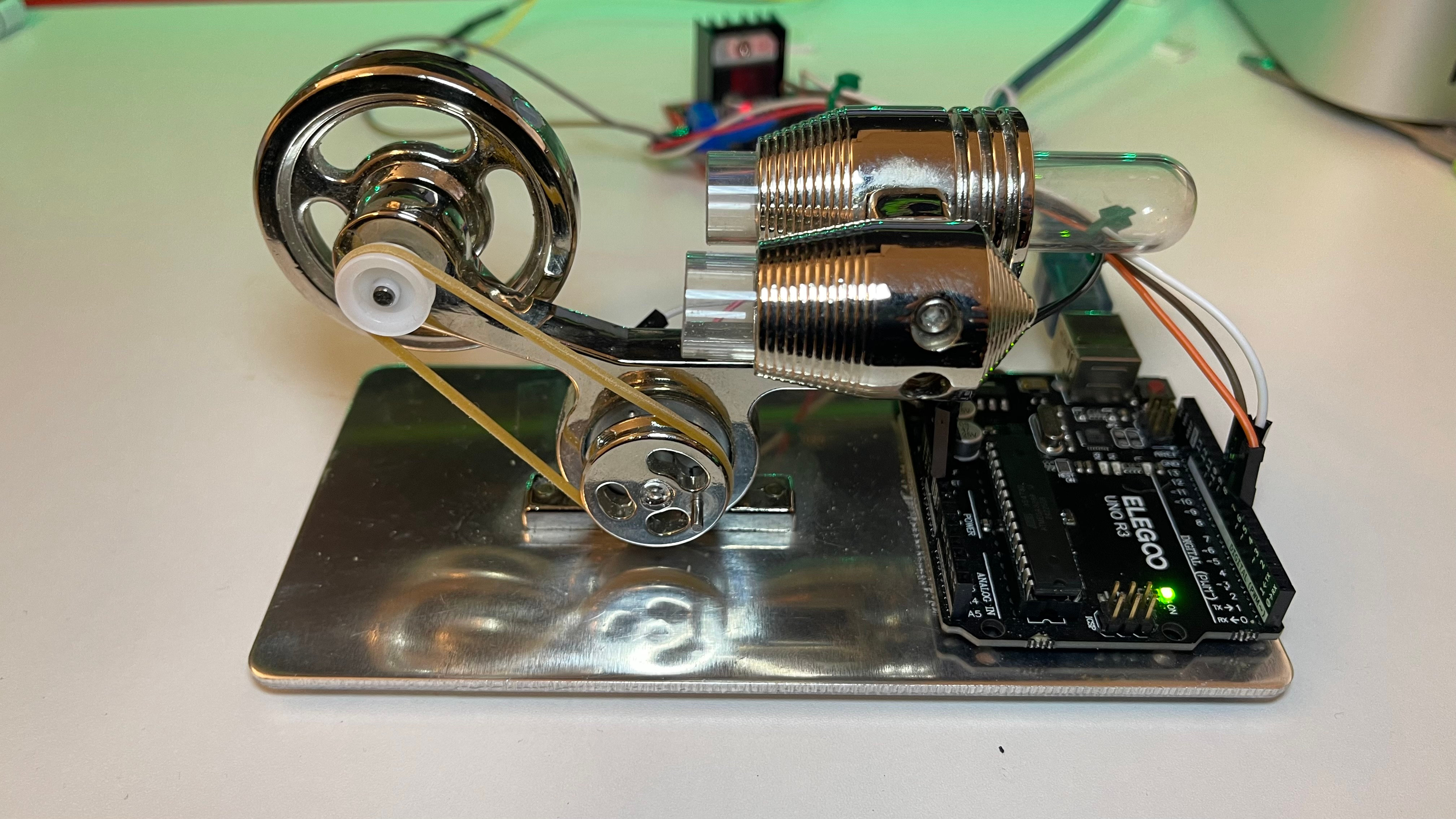
It’s a DC motor inside a gutted AliExpress Stirling-engine kit chassis. The flywheel spins faster the more tokens Claude Code is burning. When I lock the Mac, a Kasa smart plug kills the lamp on my desk and the 9V supply to the motor at the same time. When I unlock, the lamp comes back on and the motor goes back to responding to whatever Claude is doing right now.
Could I have just stared at the token counter in the terminal? Absolutely. Could I have wired a smart bulb to brighten with activity? Sure, but lights don’t hit the same. I wanted something physical moving, something my eye catches in peripheral vision the way a clock’s second hand does.
Left pane: my Claude session. Right pane: tail of the Python watcher mapping tokens to motor SPEED.
And here’s what the desk does with that signal.
TL;DR
- Arduino Uno R3 + L298N H-bridge + DC motor with flywheel (salvaged from a broken Stirling-engine kit) on a 9V supply
- Python launchd agent on macOS polls Claude Code’s local JSONL transcripts, maps token activity to motor SPEED via an exponentially-decaying activity level
- TP-Link Kasa power strip with two named outlets, one for a desk lamp, one for the motor’s 9V supply, both toggled by
screenIsLocked/screenIsUnlockednotifications- Repos and full code linked in Code and references at the bottom
The Kasa side: my desk listens to my Mac
The simplest piece. macOS broadcasts com.apple.screenIsLocked and com.apple.screenIsUnlocked notifications via NSDistributedNotificationCenter. PyObjC subscribes to both in about ten lines. On lock, the watcher calls out to a TP-Link Kasa HS300 power strip and switches off two named outlets:
- Standing Lamp is exactly what it sounds like.
- Fidget is the 9V supply for the motor rig.
nc = NSDistributedNotificationCenter.defaultCenter()
nc.addObserver_selector_name_object_(
    listener, b"onLock:", "com.apple.screenIsLocked", None
)
nc.addObserver_selector_name_object_(
    listener, b"onUnlock:", "com.apple.screenIsUnlocked", None
)
The lamp side is mood lighting. The Fidget side is also a hardware fail-safe: even if the Python crashes between sending SPEED=0 to the Arduino and the motor actually receiving it, cutting the 9V outlet at the Kasa kills the motor unconditionally. Software can write any commands it wants to a chip with no power. I like that the desk has two stop buttons, one in software and one in hardware, both wired to the same event.
python-kasa handles all the protocol. The watcher just shells out to its CLI:
subprocess.run(
    [KASA, "--host", HOST, "device", "off", "--name", child],
    timeout=20, capture_output=True, text=True,
)
There’s also a separate shell script (toggle-standing-lamp.sh) for when I want to flip the lamp manually from the command line without going through the daemon. Both live in the screen-watcher repo linked in the Code and references section.
Gutting a broken Stirling engine
The chassis is a clone Stirling-engine kit, the kind that comes with a glass cylinder, a flywheel, a drive belt, a coloured LED inside the cylinder, and instructions that say to soak a wick in denatured alcohol and light it. It was one of my favourite mechanical toys for about a month. Then I dropped it. The pistons snapped, and replacement parts for a $20 AliExpress clone basically don’t exist. The chassis sat in a box for a year while I felt vaguely guilty about it being too pretty to throw out and too useless to put back on the desk.
What’s still good about it after the fall: the mechanical bits. The flywheel is heavy, well-balanced, and looks great spinning. The drive belt couples to a small pulley on a secondary shaft. The whole assembly sits on a polished aluminium base that catches reflections.
Then I realised: I don’t need the heat engine. I just need something to spin the flywheel. A small DC motor running off a 9V supply can drive that pulley through the same belt the burner used to. The only difference is the burner cared about temperature differentials and the DC motor cares about PWM duty cycle.
I sourced a similar Stirling kit on Amazon for anyone trying to do the same thing without waiting on AliExpress shipping. The flywheel-and-belt geometry is the part that matters.
The hardware
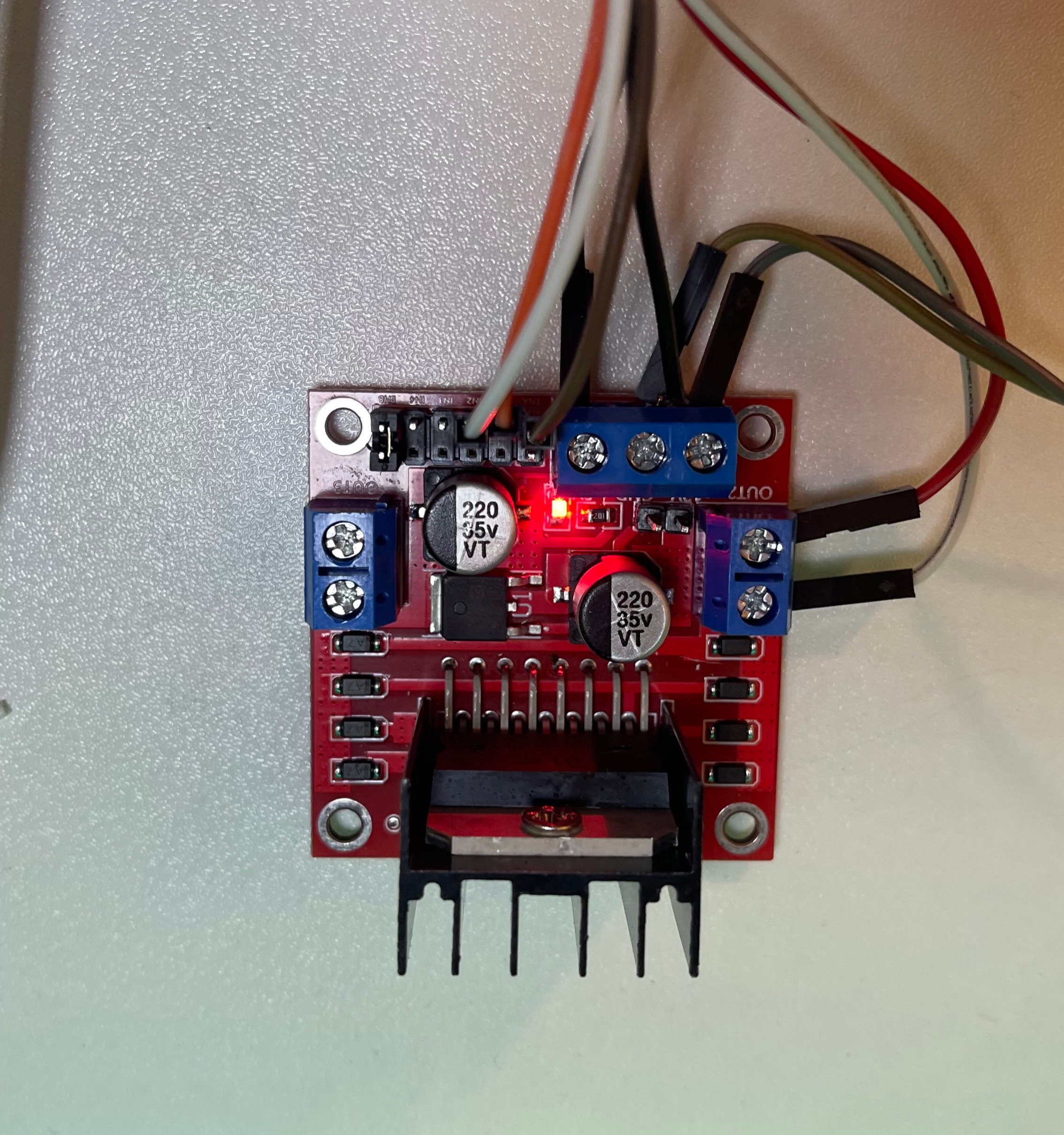
- Arduino Uno R3 doing PWM on pin 9. I’m using the one from Elegoo’s Most Complete Starter Kit V2.0 because it ships with most of the jumpers and bits a project like this eats through. The kit includes an L293D module, but I went with an L298N instead because it handles more current (2A vs ~600mA) which matters once a flywheel is doing real mechanical work.1
- L298N motor driver as the power stage. Arduino pins can’t source enough current for a real motor; the L298N switches the motor supply at the rate the Arduino dictates. The onboard 5V regulator jumper has to come off for anything above ~7V or it overheats.
- DC motor with flywheel salvaged from the Stirling kit, powered by a separate 9V supply.
- USB cable for Arduino-to-Mac comms at 115200 baud.
Wiring summary:
| From | To |
|---|---|
| Arduino pin 9 (PWM) | L298N ENA |
| Arduino pins 7, 8 | L298N IN1, IN2 |
| L298N OUT1, OUT2 | Motor + and motor - |
| 9V supply + | L298N 12V/motor input |
| Arduino 5V | L298N 5V (logic side) |
| All grounds | Tied at L298N’s GND terminal |
Two halves of the software
The Arduino sketch
A small PWM motor controller exposing a line-delimited serial protocol:
| Command | Effect |
|---|---|
SPEED=<0..10> | High-level speed. 0 stops with active brake. 1-10 maps to PWM duty via a geometric curve. |
DUTY=<0..255> | Raw PWM override (testing). |
DIR=<0|1> | Forward / reverse. |
COLD=<ms> | Manual cold-start hold at full duty. |
LIVE=<0|1> | Gate external commands on/off. |
A few constants matter:
MIN_DUTYandMAX_DUTYdefine the operating window. BelowMIN_DUTYthe motor stalls. AboveMAX_DUTYmore PWM doesn’t translate to more RPM because the supply already saturates the motor. Both calibrated empirically.COLD_DUTY+AUTO_COLD_MSgovern the cold-start kick. Going from stopped to running drives the motor at a higher duty for three seconds to overcome static friction, then settles at the target.
The onboard pin-13 LED blinks at SPEED Hz, so SPEED=1 is 1 Hz and SPEED=10 is 10 Hz. I can see the current speed at a glance even when the motor is partly hidden behind the flywheel. Full sketch is in the Arduino repo linked in the Code and references section.
The Python host watcher
A long-running script wired up as a launchd agent. It does two jobs:
- Subscribes to the screen-lock notifications described above.
- Polls Claude Code’s local JSONL transcripts every second and translates token activity into a motor SPEED.
Claude Code writes one JSONL file per session under ~/.claude/projects/<project>/. Each line has a timestamp and (for assistant messages) a message.usage block with input_tokens, output_tokens, cache_read_input_tokens, and cache_creation_input_tokens. The watcher tracks a per-file byte offset so each poll only reads newly-appended bytes. No rescanning history.
I started with a simpler version that mapped 1-minute CPU load average to motor SPEED, but load doesn’t distinguish agent burning tokens from Spotlight indexing my Downloads folder. After a week of the motor going wild every time the mail client did its hourly sync, I switched to scanning JSONL directly. The load-average version is still commented out in the repo as historical context.
Activity to SPEED mapping
The naive version is “sum the last N seconds of tokens”, but I wanted something that felt more alive. So the activity score is an exponentially-decaying level L:
each poll:
  new_tokens = scan all jsonl files for newly-appended usage
  L = L * decay_per_sec ** (seconds_since_last_poll)
  L = L + new_tokens

speed = lookup(L, threshold_table)
L jumps the instant tokens log and decays with a tuned half-life of about 30 seconds. Thresholds map L bands to SPEED 0..10. Heavy sustained activity holds L high. Brief lulls let it bleed down, and exceptional bursts push it into the SPEED 9-10 territory I reserved for “really busy.”
Bands are tuned for my workload. A casual back-and-forth conversation usually parks the motor at SPEED 2-3. An agent loop hammering on Edits and Bash calls pushes it to 7-8. The one time I saw SPEED 10 sustained was a long-running multi-file refactor with three parallel sub-agents going.
Other signals I considered
Tokens won, but they weren’t the only candidate. Things I tested or thought about and rejected:
- Live user count on this site. Would mostly read zero, which makes for a depressing desk toy.
- Unread email count. The motor would just spin nonstop, which is exactly the problem I already have.
- Slack activity. Interesting, but Slack’s API auth flow for personal use is more setup than the entire rest of this project.
- CPU temperature works, but the Mac’s fan is already a CPU-temperature indicator and I don’t need a second one.
- HN front-page churn. A desk toy that spins faster when the homepage refreshes faster. Cute, but it would only react when I wasn’t looking at HN, which is almost never.
Tokens won because they map cleanly onto “is the computer working hard for me right now”, not “is anything happening somewhere on the internet”.
Calibration was the actual work
The interesting code turned out to be a fraction of the total effort. The bulk was iterative testing:
- Finding
MIN_DUTY: what’s the lowest PWM duty where the motor reliably starts and stays running? Hovers right at the stall threshold. Varies with motor temperature, ambient friction, supply voltage. - Finding
MAX_DUTY: at what point does more duty stop translating into more speed? Above this you’re just dumping power as heat in the L298N for nothing. - Brake duration constants: only a handful of measurements, but I had to redo them when
MAX_DUTYchanged (different peak energy).
The brake is its own can of worms. The flywheel means coasting to a stop takes ten to twenty seconds, which is way too slow if you want speed reductions to feel responsive. So on speed drops (especially to SPEED=0) the sketch flips the H-bridge to reverse for a calculated duration to bleed off rotational momentum, then stops.
Duration uses an exponential-saturation model:
brake_ms = BRAKE_MAX_MS * saturation * energy_fraction
saturation     = 1 - exp(-runtime_at_speed / BRAKE_TAU_MS)
energy_fraction = (prev_eff^2 - target_eff^2) / range^2
The intuition:
- Saturation captures that a motor doesn’t reach full momentum the instant you apply power. With a flywheel, it builds for tens of seconds before steady state.
BRAKE_TAU_MSis the time constant. - Energy fraction models kinetic energy: KE scales with RPM², and RPM (above the stall threshold) scales with effective duty.
I fit the constants by running the motor at MAX_DUTY for 30s, 60s, 90s, 120s, 240s, then timing how long it actually took to stop with a stopwatch. Half a dozen data points was enough.
Things that didn’t work
I tried bumping PWM up to 3-4 kHz to hide the audible hum. The L298N is a bipolar-transistor design and its switching losses climb sharply at higher frequencies. The motor started stalling at duties that had worked fine before because the bridge couldn’t switch cleanly. Reverted to the default 490 Hz and learned to live with the hum.
The first brake-duration formula was linear in the duty drop. Kinetic energy scales with the square of velocity, so a linear model massively over-braked partial reductions and the motor would lurch backwards on every small speed change. Quadratic energy model fits the data far better.
Early calibration treated MAX_DUTY as “full motor power”. When the supply voltage went up and the motor saturated at a lower duty (64 instead of 85), the formulas broke. MAX_DUTY actually means “the duty at which the motor is already at peak”, not “the duty corresponding to full peak energy”. Subtle but it matters for the brake math.
And: bootloader corruption is real. The Arduino was sitting directly on the polished aluminium base of the Stirling chassis, and my best guess is that some of the solder joints on the underside touched the metal and shorted. The brownout that caused left the Arduino’s bootloader in a partially-corrupted state that survived USB resets and Mac reboots. Fix was reflashing the bootloader via ICSP and then putting the board on something that isn’t a conductor.
What this taught me
Embedded work, at least for projects like this, is mostly empirical loops with a stopwatch and a notebook. The motor doesn’t care about my formulas; it cares about real friction, real flywheel inertia, real supply voltage. The code only had to model those well enough that the desk felt right.
The other thing: putting a token meter on the desk made Claude Code’s activity tangible in a way the bar in the terminal never did. Brief responses look one way. Long agentic runs look another. A stall is immediately obvious because the motor parks and the LED stops blinking. My wife saw it spin for the first time on a Sunday afternoon, right after I’d ducked out of a movie with her to “finish something important”. Her expression said roughly: this is the something important? I’ve gotten pretty good at sneaking work like this past her on weekends.
This is also the third time I’ve turned broken hardware into something I use every day. The first two were the iPhone 8 solar OCR server and the Kindle Paperwhite I jailbroke into an e-ink dashboard. The pattern seems to be: broken consumer hardware is cheap, well-built, and only broken in one specific way. Repurpose around the part that still works. The same instinct showed up in my self-hosting-on-mini-PCs writeup at a different scale.
Code and references
All the code is on GitHub:
terminalbytes/screen-watcherfor the macOS Python daemon (Kasa control, Claude JSONL polling, serial writes)terminalbytes/arduino-motor-control-pwmfor the Arduino sketch (PWM, serial protocol, active reverse braking)
Useful things I leaned on while building:
- python-kasa, the underlying library and CLI for talking to TP-Link Kasa devices.
- PyObjC, Python bindings to macOS frameworks. Used here for
NSDistributedNotificationCenter. Thecom.apple.screenIsLocked/screenIsUnlockednotification names are undocumented but widely used across menu-bar tools. - Claude Code sessions docs, confirms the JSONL transcript layout under
~/.claude/projects/. - ST L298 datasheet (PDF), if you want to verify the 2A / 4A continuous / peak current numbers yourself.
Frequently asked questions
Why a Stirling engine kit specifically?
Mostly because I had one sitting around. Any chassis with a heavy flywheel and a pulley would do. The Stirling kit has the bonus of looking like an industrial-revolution prop, which I enjoy. If you don’t already own a broken one, the Sunnytech kit is close to what I had.
Can I do this without an Arduino?
In principle, yes. Anything that can do PWM and speak USB serial works: Raspberry Pi Pico, ESP32, even a Pi 5 directly via its hardware PWM pins. The Uno is just what was on my desk.
Does it distract you from work?
Less than I expected. After the first day I stopped consciously looking at it. Now it lives in peripheral vision and I only notice when it changes state: motor parks when I block, flywheel speeds up when an agent finishes thinking. Ambient information, not foreground.
Why both a Kasa smart plug and a software SPEED=0 on lock?
The Kasa cut is the fail-safe. Even if the Python script crashed mid-write, killing the 9V outlet at the strip means the motor is electrically dead. Two stop buttons, one in software, one in hardware, both wired to the same screenIsLocked event. I sleep better.
Why poll JSONL files instead of using a Claude usage API or hook?
Polling is dumb and reliable. There’s no API token to manage, no rate limit, no auth flow. The JSONL files are on local disk and append-only; one poll reads the newly-appended bytes from a handful of files in about a millisecond. If Anthropic changes the JSONL schema, I’ll find out fast because the parser will start logging zeroes. Until then it just works.
What would you change if you started over?
The big one is wireless. The Arduino being tethered to the Mac via USB limits where on the desk the rig can sit. An ESP32 (WiFi + Bluetooth built in) would let me put the spinning bit anywhere in WiFi range and have the watcher push commands over MQTT or a small HTTP endpoint. I just don’t have an ESP32 lying around, and a $10 part is the sort of thing that takes me six months to actually order. If you have one in a drawer, this whole post is a half-hour port: same L298N wiring, same serial protocol, just a different listener on the firmware side. A generic ESP32-S3 dev board or a Raspberry Pi Pico W would both work.
Happy spinning! ⚙️
Last updated: May 18, 2026
Footnotes
-
Pedantic note: the Elegoo board is an Arduino-compatible clone, not made by Arduino AG. The Arduino UNO R3 hardware design is open-source (CC-BY-SA), so plenty of vendors ship pin-for-pin identical boards. I use “Arduino” in this post as common shorthand for the design. ↩