Will Gemma 4 work on a mini PC without a GPU? Yes, and not in the grudging “technically it boots” sense. With the QAT files Google just shipped, the 26B-A4B runs at usable speeds on CPU-only boxes that cost less than a flagship phone. The real question is which Gemma 4 fits the RAM you’ve got, and that’s a table, not a debate.
Last month I wrote a whole guide on which mini PC to buy for local LLMs. This post is the opposite: what the box you already own can do now.
TL;DR:
- Gemma 4 26B-A4B is a mixture-of-experts model: 25.2B total parameters, only 3.8B active per token. It runs on CPUs that choke on dense models half its size.
- One r/LocalLLaMA user gets ~7 tokens/sec on a $150 used i5-8500 desktop with 32GB RAM and no GPU at all.
- The official QAT Q4 file is 14.4GB. Any mini PC with 32GB of RAM can serve it. 64GB gives you headroom to actually live with it.
- The dense 12B fits a 16GB box. The E4B fits in 8GB. There is a Gemma 4 for hardware you already own.
- My picks if you do want to buy: Beelink SER9 MAX 64GB at $1,179 for the 26B sweet spot, or a $309 N100 box to try the small models first.
What Google actually shipped (and why the 26B is the headline)
Gemma 4 itself has been around since the end of March. What landed in the first week of June is the version of it that matters for cheap hardware: a new dense 12B, and official quantization-aware training (QAT) Q4_0 checkpoints for the whole five-model family (E2B, E4B, 12B, 26B-A4B, 31B; all Apache 2.0). Google published the GGUFs themselves, which means no waiting around for community quants of uneven quality.
The headline act is the 26B-A4B. The “A4B” means it’s a mixture-of-experts model: 25.2B total parameters, but only about 3.8B are active for any given token (8 of 128 experts plus one shared). You get answers that benchmark like a 26B model (82.6% on MMLU Pro) with the compute cost of a 4B model.
That asymmetry is everything for cheap hardware. A dense 26B model on a CPU is a slideshow. A 4B model on a CPU is genuinely fine. The 26B-A4B answers like a 26B and runs like a 4B.
One highly upvoted comment in the r/LocalLLaMA thread that kicked this off put it better than I can:
Gemma4-26B-A4B would have been the smartest LLM in the world 18 months ago, closed models included. […] And today it runs on a mid-range home PC without a GPU. We’re living in a Star Trek episode.
The RAM math, model by model
The QAT Q4_0 files are the ones to grab. Google’s claim is that quantization-aware training preserves “similar quality to bfloat16”, and while the community consensus is a bit more sober (more on that in the gotchas section), these quants are clearly better than the old post-training Q4s they replace.
Here’s what each model needs. The file has to fit in RAM with room left for context, the OS, and whatever else your box is doing:
| Model | Type | Q4 QAT file | Realistic RAM | Runs on |
|---|---|---|---|---|
| E2B | Compact dense (2.3B effective) | 3.35GB | 8GB | Anything made this decade |
| E4B | Compact dense (4.5B effective) | 5.15GB | 8-16GB | N100 boxes, old laptops, phones |
| 12B | Dense, multimodal | 6.98GB | 16GB | N150 tier and up |
| 26B-A4B | MoE, the good one | 14.4GB | 32GB | Any 32GB mini PC |
| 31B | Dense, flagship | 17.7GB | 32-64GB | 64GB boxes, ideally with iGPU |
Two things jump out of that table. First, the 26B-A4B at 14.4GB technically squeezes into a 24GB machine, but 32GB is where it stops being a science experiment and starts being a daily driver. Second, the 12B at under 7GB fits boxes that cost less than a video game console.
The E2B and E4B even have 2-bit QAT checkpoints (the only sizes that do), which is how people in the threads are running them on phones. Someone is presumably already drafting the “Gemma 4 on a Raspberry Pi Zero” YouTube thumbnail.
Real numbers from real potatoes
I haven’t bought inference hardware yet this year (still waiting out the rampocalypse pricing like everyone else), so the table below is community-reported numbers from the June threads, with hardware context so you can map them to your own gear:
| Hardware | Model | Speed | Notes |
|---|---|---|---|
| i5-8500, 32GB DDR4, no GPU | 26B-A4B Q4 | ~7 tok/s | $150 used desktop, Koboldcpp on Linux |
| Ryzen 7 5700X, 32GB DDR4-3600, RX 6600XT 8GB | 26B-A4B QAT Q4_K_XL | 29 tok/s | Mid-range 2021-2022 gaming PC, no MTP |
| 12GB VRAM GPU | 12B QAT + MTP | 120 tok/s | Fits entirely in VRAM, llama.cpp MTP patch |
| RX 7900XT 20GB | 26B-A4B QAT | ~120 tok/s | Whole model in VRAM |
| RTX 3090 + ngram decoding | 12B QAT + MTP | 400+ tok/s | Code-editing workloads only |
The first row is the one that matters. Seven tokens per second is roughly reading speed. On an eight-year-old office PC with no GPU. The thread author’s framing was “go ahead and scoff, you can brag about your super-rig that costs more than a used car, but I’m bragging about a crappy old desktop.”
For calibration: that same machine runs dense 12B models “slow but perfectly useable”, which in practice means low single digits. All of that delta is the MoE architecture.
The MTP rows deserve a note. Gemma 4 ships with multi-token prediction support, and llama.cpp merged it on June 7 after days of people running the patch manually. It’s a speculative-decoding-style speedup. Per the PR author’s benchmarks it more than doubles throughput on the dense 31B (the 120 tok/s row above is the community seeing the same on the 12B), while the MoE 26B-A4B showed no speedup on his hardware. So: big deal for the 12B and 31B, skip it for the 26B-A4B. The how-to is further down.
How much mini PC does Gemma 4 need?
Before any links: check what’s already on your desk. If you have anything with 32GB of RAM, you can run the 26B-A4B tonight for free, and you should do that before spending a dollar. This is the rare hardware post whose first recommendation is “maybe nothing”.
If you’re buying, here’s how I’d tier it.
The $309 toe-dip: OUMAX N100, 16GB. A 16GB N100 box runs the 12B Q4 with room to spare, and the E4B flies on it. You won’t run the 26B here, and prompt processing on the N100’s single-channel memory will test your patience on long inputs. But as a “do I even like having a local model?” experiment that doubles as a homelab services box afterwards, it’s the cheapest sensible entry. The Beelink Mini S13 (N150, 16GB) at $399 is the same idea with a slightly newer chip.
The cheapest 26B ticket: PELADN Ryzen 7 7840HS, 32GB DDR5, $569. This is the gap most buying guides skip: a 32GB machine is the entry ticket for the 26B-A4B, and you don’t need to spend four figures to get one. Eight Zen 4 cores, a Radeon 780M iGPU for the Vulkan backend, 32GB of DDR5, and change from $600. It’s a substantially newer chip than the i5-8500 doing 7 tok/s in the table above, so treat that number as your floor, not your ceiling.
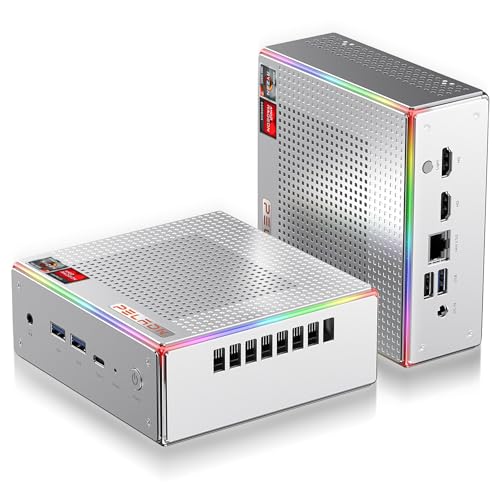
The sweet spot: Beelink SER9 MAX, Ryzen 7 H 255, 64GB DDR5, $1,179. Eight Zen cores, dual-channel DDR5, Radeon 780M iGPU, and 64GB of RAM. The 26B-A4B fits twice over, which in practice means you keep it loaded while the box also runs your containers. The 780M takes a meaningful bite out of prompt-processing time versus pure CPU, and llama.cpp’s Vulkan backend handles it without drama. This is the box I’d buy for this model.
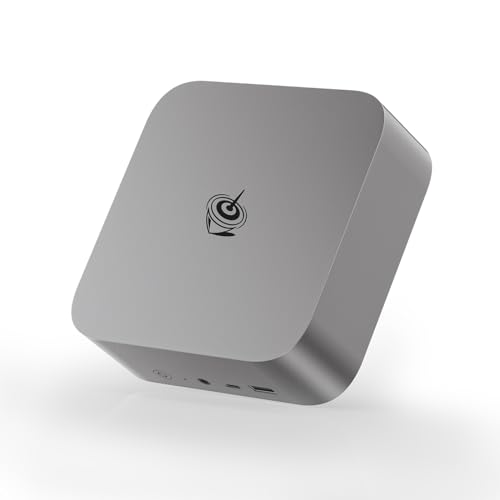
The “I want the 31B too” tier: GMKtec Ryzen AI MAX+ 395, 64GB LPDDR5X, $2,100. Strix Halo’s 256 GB/s unified memory is the difference between the dense 31B being “loadable” and being pleasant. The 64GB SKUs ($1,999 to $2,100 as I write this) are a much easier swallow than the $3,299 flagship 128GB boxes, and for the Gemma 4 family specifically, 64GB covers everything. My Strix Halo deep-dive covers the platform’s gotchas (the 120W eGPU cap, the bandwidth ceiling) if you’re considering this tier.
The sleeper option: a Crucial 64GB DDR5 SODIMM kit, $684. If you already own a mini PC with SODIMM slots (most Ryzen boxes outside the soldered LPDDR5 crowd), doubling the RAM turns a “runs the 12B” machine into a “runs the 26B-A4B comfortably” machine for a third the price of a new box. Check whether your RAM is soldered before ordering. Soldered LPDDR5 means no upgrade, ever.
And for the box people ask about most under every Strix Halo thread: the MINISFORUM AI X1 family runs Gemma 4 fine. A 32GB X1 handles the 26B-A4B at the CPU-class speeds in the table above, and the X1 Pro-470 (32GB, Ryzen AI 9 HX 470) adds a stronger iGPU for faster prompt processing.
How to run Gemma 4 (Ollama, llama.cpp, MTP)
No NPU, no CUDA, no Python environment anywhere in this section. Pick your path based on how much control you want.
Ollama, the two-minute path
If you just want to talk to the model, Ollama has the whole family:
# The MoE flagship (18GB download, needs a 32GB machine)
ollama run gemma4:26b

# The dense 12B for 16GB machines
ollama run gemma4:12b

# The small ones, for 8GB boxes
ollama run gemma4:e4b
Ollama’s gemma4:26b tag pulls an 18GB file, its own default quant. If you specifically want Google’s leaner 14.4GB QAT Q4_0 (you probably do on a 32GB box), point Ollama straight at the Hugging Face repo. Ollama supports this natively:
# Pull Google's official QAT GGUF instead of Ollama's default quant
ollama run hf.co/google/gemma-4-26B-A4B-it-qat-q4_0-gguf
That hf.co/{user}/{repo} syntax works for any GGUF on the Hub, with an optional :{quant} tag if a repo carries multiple quantizations.
The homelab version: llama.cpp server
llama.cpp is what I’d run on a headless mini PC: lighter than Ollama, an OpenAI-compatible API out of the box, and the new toys tend to be documented here first (the MTP recipe below is built on it). You don’t even need to compile; the project publishes prebuilt binaries for Windows, macOS, and Ubuntu, including Vulkan builds for iGPU users.
One gotcha: if llama.cpp dies with unknown model architecture: 'gemma4', your build is outdated. Update llama.cpp (brew update && brew upgrade llama.cpp, or your distro’s equivalent) before blaming the model.
If you’d rather build (or you’re on something the binaries don’t cover):
git clone https://github.com/ggml-org/llama.cpp
# Plain CPU build. For an iGPU, add -DGGML_VULKAN=ON to the first command.
cmake -B build llama.cpp && cmake --build build --config Release -j
Then serve. llama.cpp pulls GGUFs straight from Hugging Face, so there’s no manual download step:
# Serve the 26B-A4B QAT straight from Hugging Face
# (swap in google/gemma-4-12B-it-qat-q4_0-gguf for 16GB machines)
./build/bin/llama-server \
    -hf google/gemma-4-26B-A4B-it-qat-q4_0-gguf \
    --ctx-size 16384 \
    --host 0.0.0.0 --port 8080
That gives you an OpenAI-compatible API at http://<box-ip>:8080/v1 plus a built-in web chat UI at the same address. Point your editor plugin, Open WebUI, or whatever client you already use at it and you’re done.
Here’s that exact command serving the 26B-A4B, captured live and playing at real speed (no speed-up applied): prompt typed into the built-in web UI, a visible reasoning pass, then the answer streaming in.
Full disclosure: that capture is from my desktop, not a mini PC, so treat its speed as a ceiling rather than a promise. The benchmark table above is what mini-PC-class hardware does with this model.
The two flags worth understanding:
--ctx-sizeis your main RAM lever after the model itself. 16K context on the 26B-A4B keeps total usage well inside 32GB. The model supports 256K, but every token of context costs memory, so grow it only as needed.-ngl alloffloads every layer to the GPU (any number works too, for partial offload). On a 780M-class iGPU with a Vulkan build, this mostly helps prompt processing rather than generation, which is exactly where CPU-only setups hurt.
Koboldcpp runs the same GGUFs if you prefer it; the i5-8500 numbers in the benchmark table are Koboldcpp.
Pro tip: if generation speed looks fine but the model takes forever before the first token appears, that’s prompt processing, and it’s the known weak spot of CPU inference. Keep your system prompts short, and don’t paste a 40-page document into a CPU-only box and expect magic.
Turning on MTP (the free 2x, dense models only)
Multi-token prediction landed in llama.cpp PR #23398. The PR author’s invocation, verbatim:
# MTP-enabled serving for the dense 31B
# (the author's repo bundles the MTP head; see notes below for QAT models)
llama-server -hf am17an/Gemma4-31B-it-GGUF \
    --spec-type draft-mtp --spec-draft-n-max 4
His mtp-bench numbers (on a DGX Spark): roughly 6 tok/s without MTP, 11 to 19 tok/s with it, depending on the task. Code and stepwise math accept the most drafted tokens; creative writing the least.
Before you chase this:
- It only pays off on the dense models. The PR author observed no speedup on the MoE 26B-A4B (it already has so few active parameters that drafting doesn’t help). E2B and E4B aren’t supported at all. Target: 12B and 31B.
- The model file needs the MTP head. Plain QAT GGUFs don’t bundle it; the early benchmarkers paired Unsloth’s 12B QAT GGUF with Google’s separate assistant checkpoint as the draft model (the recipe is in this thread). If you see
unknown model architecture: 'gemma4-assistant', your llama.cpp build predates the June 7 merge; update and rebuild. - Update before trying. The merge landed June 7, so any build or release from June 8 onward has it. If you compiled earlier, pull and rebuild.
Make it survive a reboot
An LLM box you have to SSH into and restart by hand after every power blip will stop getting used within a month. One systemd unit file fixes that:
# /etc/systemd/system/gemma.service
[Unit]
Description=Gemma 4 llama.cpp server
After=network-online.target
Wants=network-online.target

[Service]
ExecStart=/opt/llama.cpp/build/bin/llama-server \
    -hf google/gemma-4-26B-A4B-it-qat-q4_0-gguf \
    --ctx-size 16384 --host 0.0.0.0 --port 8080
Restart=on-failure
User=llama

[Install]
WantedBy=multi-user.target
# Enable and start it
sudo systemctl daemon-reload
sudo systemctl enable --now gemmaAdjust the ExecStart path to wherever your binary lives and User to a real account on the box. First start takes a while because -hf downloads the 14.4GB model into that user’s cache; watch it with journalctl -u gemma -f. After that, the box boots straight into a serving state, which is the whole point of putting this on a mini PC instead of your laptop.
The gotchas worth knowing before you order
QAT is not free quality. Google’s “similar quality to bfloat16” line is doing some heavy lifting. The community ranking that emerged after a few days of testing is: Q8 > Q4 QAT >> old-style Q4. If your hardware fits the Q8, the Q8 is still better. QAT’s real payoff is making the Q4 tier respectable, which matters precisely on the RAM-constrained machines this post is about. On a 32GB box, Q4 QAT is the right call. On a 64GB box, consider the Q8 of whichever size you run.
Prompt processing is the real CPU tax. Generation speed gets all the Reddit screenshots, but the slow part of CPU inference is reading your input. A chat-style workflow with short prompts feels great at 7 tok/s. A RAG pipeline stuffing 20K tokens of documents into every request will crawl. If that’s your workload, the iGPU tiers (or my openclaw mini PC comparison if you’re running agents) are worth the extra money.
MoE needs all its weights in memory. Only 3.8B parameters are active per token, but all 25.2B sit in RAM. Don’t buy a 16GB machine expecting to swap experts from disk; it will technically run and practically ruin your week.
The 31B is a different animal. It’s dense, so all 17.7GB of Q4 weights get touched constantly, and memory bandwidth becomes the wall. On pure CPU it’s rough. That model is the reason the Strix Halo tier exists in the table above.
FAQ
Will Gemma 4 work on a Minisforum AI X1-255? Yes. 32GB of RAM covers the 26B-A4B QAT Q4 (14.4GB file) with normal context sizes, and the smaller models trivially. Expect CPU-class speeds: usable for chat, slow for long-document processing.
How much RAM do I need for Gemma 4 26B-A4B? 32GB is the comfortable answer. The Q4 QAT file is 14.4GB, so 24GB works with a lean OS and modest context, but 32GB means never thinking about it. 16GB does not fit this model; run the 12B instead.
Can I run Gemma 4 with Ollama?
Yes. ollama run gemma4:26b (or :12b, :31b, :e4b, :e2b). For Google’s leaner QAT quant instead of Ollama’s default, use ollama run hf.co/google/gemma-4-26B-A4B-it-qat-q4_0-gguf.
Does MTP speed up the 26B-A4B? No. MTP roughly doubles throughput on the dense models (the llama.cpp PR author benchmarked the 31B; community tests show the same on the 12B) but it showed no speedup on the MoE 26B-A4B, and E2B/E4B aren’t supported.
Is the 12B or the 26B-A4B better for a weak machine? Counterintuitively, the 26B-A4B is usually faster than the dense 12B on CPU (3.8B active versus 11.95B active) while being smarter. The 12B’s advantages are its smaller memory footprint and audio input support. If you have 32GB of RAM, run the 26B. If you have 16GB, the 12B is your ceiling.
Can I run Gemma 4 on a Raspberry Pi? The E2B and E4B, yes, especially with their 2-bit QAT checkpoints. The 26B-A4B, no. A Pi 5 with 16GB tops out at the 12B in theory, but the experience is not something I’d inflict on you. A $250 used office PC is a far better dollar-per-token deal.
Resources
Related posts on terminalbytes:
- Best mini PC for local LLMs in 2026 (Strix Halo era), the hardware deep-dive this post complements
- You don’t need a Mac Mini to run OpenClaw, for the agents-on-mini-PC crowd
- Best mini PCs for home lab 2025, if the LLM is just one tenant on the box
External:
- Gemma 4 26B-A4B QAT GGUF, the file this whole post is about (the rest of the family is linked from the same page)
- The r/LocalLLaMA QAT release thread, where the quality discussion lives
If you’ve got a 32GB box gathering dust somewhere, tonight is the night it earns its keep.
Happy quantizing! 🧮
Last updated June 2026, two days after the MTP merge. If you’re reading this in 2027, the speeds in that benchmark table are probably comically out of date.