I finally pulled the numbers after seeing a screenshot of a VPS invoice that had gone up 543 percent in two years, posted by someone who thought they were still running the same thing. The replies split the way they always do: half saying “this is why I run a box at home,” half saying “my Hetzner bill hasn’t moved.” Both camps were arguing from vibes. I have a smart plug on my home server, so I can argue from a kilowatt-hour count.
The mini PC under my desk used 22.088 kWh in August, which the plug priced at CA$3.08. That’s the entire monthly running cost of every service it hosts.
TL;DR
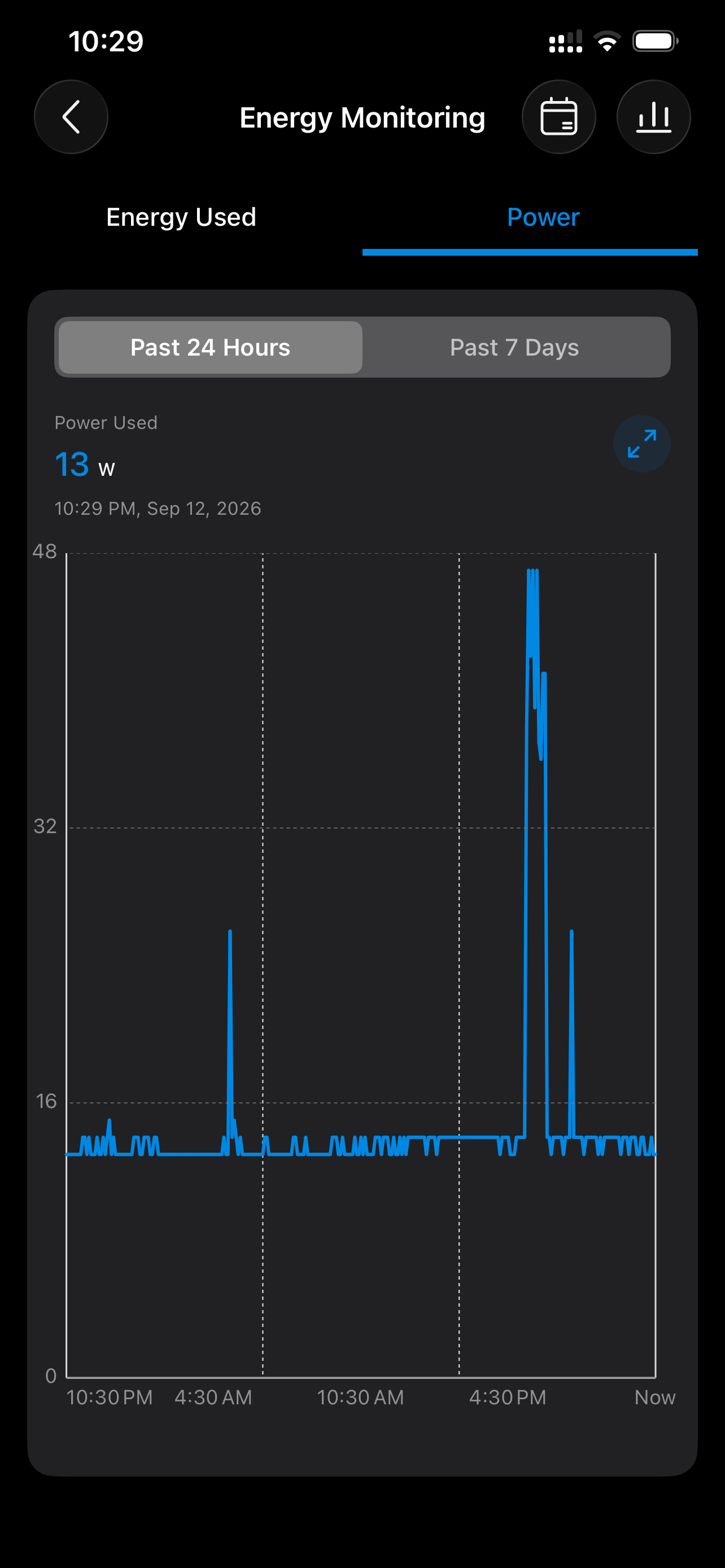
- Two full months on the plug: 23.316 kWh in July (CA$3.25) and 22.088 kWh in August (CA$3.08). Baseline draw is 13 W, with short spikes to about 47 W.
- The box is a $279 Intel N150 mini PC with 16GB. At roughly $3 a month in electricity, it pays for itself in about 3 months against DigitalOcean’s 16GB Droplet ($96), in about 13 months against the 4GB one ($24), and in about 93 months against the $6 one, longer than the box will last.
- The cheap tier is still cheap. DigitalOcean’s 1GB Basic Droplet is $6 a month and Hetzner’s smallest Arm box went from €4.49 to €5.99 in June. The bill only explodes when the workload outgrows 1GB.
- Oracle’s Always Free Arm tier is still $0, but it was cut to 2 OCPU and 12GB this year. It remains the right answer for the things that need a public IP.
- Keep one cheap or free box in the cloud as a front door. Put everything with state, storage or a GPU at home.
Two months on the plug
The plug is a TP-Link Tapo with energy monitoring, the kind that sells in a two-pack for $16.99. It reports energy per hour, per day and per month, and it lets you type in your electricity rate so the app prices each month for you. Mine is set to what my utility charges per kilowatt-hour, and the app did the multiplication.
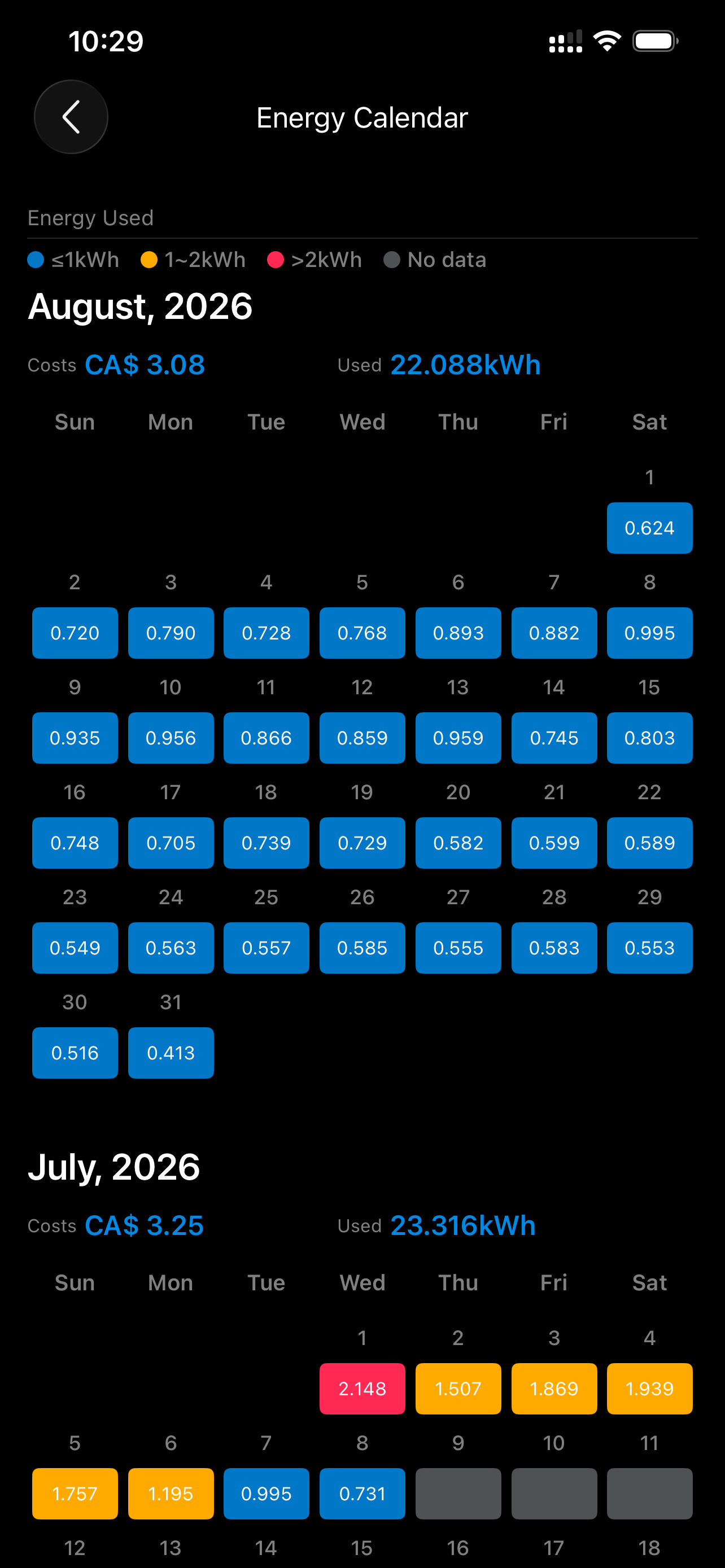
The calendar shows two different machines, depending on the week. The first week of July runs 1.5 to 2.1 kWh a day, and everything from mid-July onward sits between 0.5 and 1.0. In early July the box was working hard around the clock. From mid-July it was idling with a dozen containers up. At my rate, a full month of the busy pattern would cost CA$6 to CA$9, and a full month of the idle pattern CA$2 to CA$4.
A normal day, on the 24-hour power graph, is a flat line at 13 W with a couple of spikes to the mid-40s in the late afternoon when scheduled jobs run. Twenty-two and a half hours of runtime on the day I took the screenshot came to 0.341 kWh, which is a 15 W average.
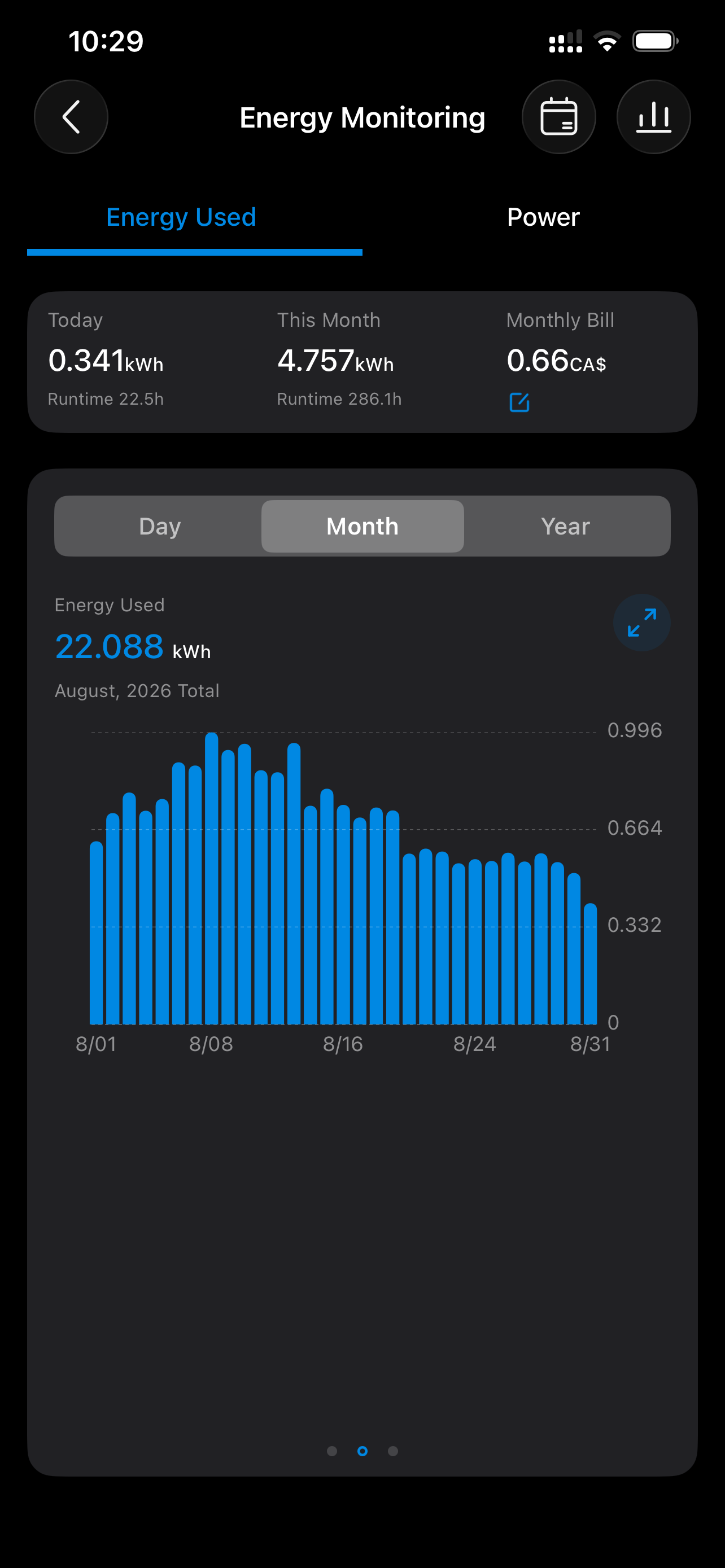
Twelve days into September the running total was 4.757 kWh over 286 hours, and the app’s month-to-date bill read CA$0.66. September is on track to be the cheapest month yet.
The box behind the number
It’s a KAMRUI Essenx E1, an Intel N150 mini PC with 16GB of DDR4 and a 256GB SSD, $279 on Amazon as I write this. Four cores, no fan noise I can hear from the couch, and the 13 W baseline you see in the graph. It runs Docker and hosts the kind of stack this site keeps writing about: a reverse proxy, a database or two, game servers, backups, and small web apps that would otherwise be sitting on a rented machine.
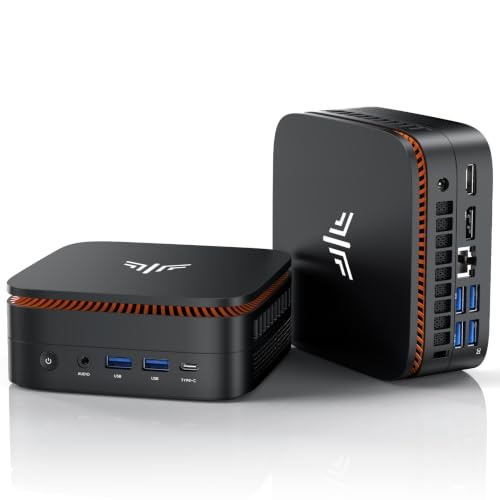
Could you do this on an old laptop or a retired office desktop? Yes, and I’ve written about why mini PCs took over that job anyway. Say the old desktop idles at 40 W, which is the conservative end for a tower with a discrete GPU and a couple of drives in it. At my rate that’s about CA$4 a month, CA$1 more than the N150 for the same containers, or CA$3 more if it’s the kind of tower that idles at 60. Over four years that’s CA$50 to CA$150, so electricity alone won’t cover the $279 in the time you’d keep it. I’d still take the mini PC for the size and the silence, with a fresh SSD thrown in.
Cloud prices in 2026
Both camps had a point. The cheap tier hasn’t moved much, and the bill explodes when you outgrow it.
The verifiable half of the “it hasn’t moved” story is Hetzner’s own price adjustment page. Their smallest Arm box, the CAX11, went from €4.49 to €5.99 a month ($5.49 to $6.99) for new orders and rescales from 15 June 2026, and orders placed before that date kept the old price. That’s a real increase, and it’s not 543 percent.
DigitalOcean’s Droplet pricing page still sells bundled Basic plans with a flat monthly cap, and the small ones look like this:
| Basic Droplet | vCPU | SSD | Monthly |
|---|---|---|---|
| 1 GiB | 1 | 25 GiB | $6 |
| 4 GiB | 2 | 80 GiB | $24 |
| 16 GiB | 8 | 320 GiB | $96 |
The last row matches my box on memory, and nobody in the thread was quoting it. There’s also a newer per-resource line, the v5 Droplets, where the pricing documentation bills a shared vCPU at $0.0158219 an hour and memory at $0.0040411 per GiB-hour with no monthly cap. Those are the rates people are pasting when they say cloud got expensive, and they’re real, but the $6 plan is still on the same page.
So the $5 box you remember is $6 or $7 now, and it still runs a reverse proxy and a VPN without complaint. It won’t run a game server, a photo library, a database with a few years of history and a Jellyfin catalog at the same time. Once the workload needs memory, you’re on the $24 or $96 row, whichever provider you’re with.
The arithmetic, with my numbers in it
Hardware $279, electricity call it $3 a month. CA$3.08 is about US$2.22 at today’s exchange rate, so rounding up to $3 is a gift to the cloud side.
| Cloud option | Monthly | Saving vs home ($3/mo) | Months to pay off the $279 box |
|---|---|---|---|
| Basic Droplet, 1 GiB | $6 | $3 | 93 |
| Basic Droplet, 4 GiB | $24 | $21 | 13 |
| Basic Droplet, 16 GiB | $96 | $93 | 3 |
| Oracle Always Free Arm (2 OCPU / 12GB) | $0 | none | never |
If everything you run fits in 1GB, the mini PC never wins on money. Ninety-three months is longer than the box will live, and the Droplet comes with a public IP and someone else’s on-call rota. If what you run needs the 16GB, the box pays for itself in a quarter and then costs $3 a month against $96.
Oracle’s free Arm instance belongs in the same table. After the 2026 cut it’s still 2 OCPU and 12GB of RAM, more than the $24 Droplet, for nothing. If your workload fits in it and you can live with the risk of Oracle reclaiming idle capacity, the home box never wins on money there either. I still run my VPN on Oracle’s free tier for exactly that reason.
That turns “cloud versus home” into a sorting problem. Here’s how mine sorted out:
- At home: anything with real storage (media, backups, photo libraries), anything with a database bigger than a few hundred megabytes, game servers, and anything that wants a GPU or a lot of RAM. The mini PC has 16GB for the price of three months of the 16GB Droplet.
- On the free Arm box: the VPN endpoint, a reverse proxy or tunnel front door, uptime monitoring, and anything that needs to stay up when my house loses power.
- On a paid VPS: nothing, currently. The moment I need a second public IP or a region I don’t live in, it’ll be the $6 Droplet or the €5.99 Hetzner box, and the mini PC will keep doing the heavy work behind it.
Costs the plug can’t see
Electricity is the only recurring cost. A few other things belong on the home side of the ledger.
- Houses lose power and data centers mostly don’t. A cheap APC BE425M at $62.50 covers the router and the mini PC through a short outage and gives a clean shutdown for a long one. That’s a one-time cost I’d add to the $279.
- Residential upload is limited. Serving a 4K movie to a friend across the country from home works fine, and serving a busy public site does not. That’s what the cloud front door is for.
- A mini PC is a computer you own. Kernel updates, a dead SSD, a Docker daemon that won’t start after a power cut, all yours. I enjoy that. Not everyone does, and $24 a month is a perfectly rational price for never thinking about it.
- My rate is about CA$0.14 per kWh, which is on the low side. At CA$0.30 per kWh the same 22 kWh is CA$6.60, call it US$5, and the box pays off in about 15 months against the $24 Droplet and still about 3 against the $96 one. Against the $6 Droplet it never does.
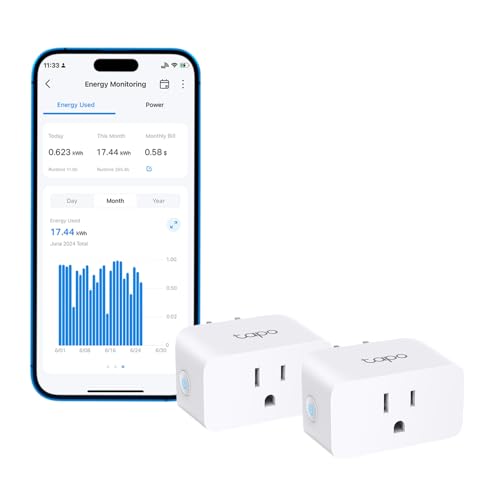
The plug is the cheapest part of this whole exercise, and the part I’d tell anyone to start with. I’d put one on whatever you’re running today and check back in a month.
Resources
- DigitalOcean Droplet pricing for the bundled plans, and the per-resource pricing documentation for the v5 rates
- Hetzner’s June 2026 price adjustment
- Oracle’s Always Free resources documentation, and my post on the 2026 Always Free cut
- On this site: the self-hosting mini PC post and running game servers on a mini PC
Some links above are Amazon affiliate links. If you buy through them, this site earns a small commission at no extra cost to you.
13 W and counting. 🔌
Last updated: September 2026