I wanted to see whether Kitten-TTS 2 could replace Piper on a small Home Assistant box, the kind that’s just an Intel mini PC with no GPU anywhere in the voice path. Version 0.2.0 of its CPU runtime hit PyPI on October 21. The project pitches it as a 1.7B-parameter text-to-speech model with voice cloning and emotion tags, squeezed down to 1.58-bit ternary weights so it “runs realtime on CPUs”. The same week, the Open Home Foundation’s October newsletter was titled How to take back your voice, all about pulling Echo Dots and Google Home Minis out of Big Tech’s hands and into Home Assistant.
So I installed it, timed it at seven thread counts from 1 to 28, put it next to Piper and the older Kitten-TTS 0.8 models, and then wrote a small Wyoming server so a real Home Assistant 2026.10 instance could use it.
TL;DR
- Kitten-TTS 2 runs on a CPU, and at 8, 12 and 16 threads on my Mac it beat real time. At 4 threads it didn’t: “Turned on the kitchen lights.” (2 seconds of audio) took 3.2 seconds to synthesize.
- It needs about 3GB of RAM and a 1.66GB download. Piper needs about 300MB of RAM and a 63MB voice file, and answered the same sentence in 35 milliseconds at 4 threads.
- More threads stopped helping much after 12. An all-cores run (28 threads) was contended and fell to an RTF of about 33, so give it only the cores you can spare.
- It plugs into Home Assistant fine. My Wyoming server, under 60 lines of Python, showed up as
tts.kitten_tts_2and answered in 3.7 seconds through Home Assistant.- For a 4-core N100 or N150 box today, I’d keep Piper (or try Kitten-TTS 0.8 nano) and save Kitten-TTS 2 for a machine with more cores.
What it takes to run Kitten-TTS 2 on a CPU
The KittenTTS repository describes Kitten-TTS 2 as a speech language model: a 1.7B-parameter transformer that reads text and writes audio codec tokens, which a separate decoder turns into 24kHz audio. The linear weights are ternary, so every value is one of three numbers per 128-weight group, and the Hugging Face model card says that packing shrinks the language model from 3.47GB in bf16 to 0.95GB with bit-identical audio. It ships 115 built-in voices (the card’s count; the README says 47), cloning from a 5 to 30 second clip, ten [emotion] tags marked beta, and text normalization for numbers and dates.
The CPU path that matters is kitten-tts-2-cpp, a llama.cpp fork with kernels for the ternary format, and its Python wheel kitten_tts_cpp. That’s what I benchmarked. It’s marked beta, and it does built-in voices out of the box, since cloning needs an offline Python prep step and a reference transcript first.
Before you get attached, read the license and remember the older models:
- The license: the code is Apache 2.0, but the weights are under the Stellon Labs Community License. Personal and hobby use is free. Commercial use is free (you have to register) until you or your affiliates pass USD $1,000,000 in annual revenue or in total funding, and then you need a separate license.
- The older models still exist: Kitten-TTS 0.8 is a set of small ONNX models (nano at 15M parameters, mini at 80M) with eight voices and no cloning. Same
pip install kittenml, very different hardware story.
How I tested it (a Mac pretending to be a mini PC)
I don’t have numbers from a real N150 in this post. Everything below ran on my Mac Studio M3 Ultra (20 performance cores, 8 efficiency cores, 256GB), with the thread count pinned per run. Intel’s N150 spec page lists 4 cores, 4 threads and a 3.6GHz max turbo, so the 4-thread rows are the ones shaped like that box. I’d expect four N150 cores (6W base power, per that same page) to be slower than four M3 Ultra performance cores, so read every 4-thread number as a best case for a 4-core mini PC.
The setup, in its own virtual environment:
# Python 3.12 venv; versions as tested on 2026-10-24
uv venv --python 3.12 tts-venv
uv pip install --python tts-venv/bin/python \
    kitten_tts_cpp==0.2.0 kittenml==0.9.6 piper-tts==1.8.0 wyoming==1.10.2 soundfile psutil

# Piper's lessac voice, the usual English default
tts-venv/bin/python -m piper.download_voices en_US-lessac-medium --download-dir piper-voices
Each engine and thread count ran in a fresh process. The benchmark loads the model from a warm cache, does one throwaway “Okay.” to pay the first-call cost, then synthesizes five Home Assistant-style replies three times each, from “Turned on the kitchen lights.” up to a two-sentence morning weather summary. For Kitten-TTS 2 the thread count goes straight into the constructor; for the ONNX engines I forced intra_op_num_threads on every onnxruntime session:
from kitten_tts_cpp import KittenTTS

# threads drives llama.cpp; the LibTorch decoder defaults to the same count
model = KittenTTS("KittenML/kitten-tts-2", threads=4)
audio = model.generate("Turned on the kitchen lights.", voice="Bruno")  # float32, 24 kHz
The real-time factor (RTF) in the tables is synthesis time divided by audio length. Under 1.0 is faster than real time.
The numbers at 4 threads: Kitten-TTS 2 vs Kitten 0.8 vs Piper
| Engine (4 threads) | Download | Load | Peak RAM | ”Kitchen lights” | Weather (two sentences) | RTF |
|---|---|---|---|---|---|---|
| Kitten-TTS 2, default decoder | 1.66GB | 2.1s | 3.1GB | 3.17s | 11.89s | 1.38 |
Kitten-TTS 2, student_w4 decoder | 1.38GB | 1.0s | 2.8GB | 2.94s | 11.45s | 1.32 |
| Kitten-TTS 0.8 mini (80M) | 82MB | 0.7s | 454MB | 0.16s | 0.64s | 0.066 |
| Kitten-TTS 0.8 nano int8 (15M) | 28MB | 0.7s | 286MB | 0.09s | 0.38s | 0.034 |
Piper en_US-lessac-medium | 63MB | 0.7s | 295MB | 0.04s | 0.17s | 0.024 |
Times are medians of three runs, and RAM is the peak resident size of the whole Python process, in decimal GB and MB. The download column is what each engine actually pulled into its cache: for Kitten-TTS 2 that’s the 1.03GB GGUF, the decoder and a voices file. The first load of Kitten-TTS 2 took 236 seconds on my connection, nearly all of it download.
Piper is about 90 times quicker than Kitten-TTS 2 on the short reply, and it uses a tenth of the memory. Piper is a small model built for exactly this job (Home Assistant’s local voice guide says it generates 1.6 seconds of voice per second on a Raspberry Pi with medium-quality models), and Kitten-TTS 2 runs a 1.7B transformer one codec token at a time.
The smaller student_w4 decoder barely moved the time, which matches the model card’s own warning that quantising the decoder “shrinks storage and memory bandwidth, not arithmetic”. The per-run reports from the C++ runtime show where the time goes: with the 4-bit decoder at 4 threads, 85.3 seconds of the 93.3-second total were the language model and 7.7 seconds were the decoder.
Pro tip: don’t judge Kitten-TTS 2 by its first sentence. The first call after load took 3.4 seconds even for “Okay.”, so keep the server running instead of starting it per request.
Threads from 1 to 28: real time at 8, flat after 12
Here’s Kitten-TTS 2 (default decoder) across thread counts on the same five sentences:
| Threads | ”Kitchen lights” (2s of audio) | Weather (about 9s of audio) | RTF | Peak RAM |
|---|---|---|---|---|
| 1 | 10.01s | 40.02s | 4.56 | 3.1GB |
| 2 | 5.81s | 21.58s | 2.44 | 3.2GB |
| 4 | 3.17s | 11.89s | 1.38 | 3.1GB |
| 8 | 2.11s | 7.29s | 0.90 | 3.4GB |
| 12 | 1.82s | 6.20s | 0.76 | 3.3GB |
| 16 | 1.78s | 5.23s | 0.75 | 3.5GB |
| 28 (all cores, contended) | 50.92s | 447.93s | 32.93 | 3.1GB |
Eight threads is where it crosses real time. Twelve and sixteen are nearly identical, so the scaling runs out well before the core count does.
The 28-thread row is a contended run. My benchmark script set 28 threads for the language model and 28 torch threads for the LibTorch decoder, so about 56 threads competed for 28 cores, on top of other benchmark jobs running on the Mac at the same time. The load average went from about 12 at the start to about 70 while it ran. It took 40 minutes of wall clock for about 71 seconds of audio, an RTF of about 33. On a mini PC that also runs Home Assistant, Frigate or Jellyfin, set threads to the cores you can actually spare, and don’t set both thread pools to the full core count.
The 1-thread run also turned up a bug. My first 1-thread run died with RuntimeError: no finite sampling candidates after the fourth sentence. A rerun that logged failures pinned it to the weather sentence with seed 1274, while the same seed worked at every other thread count. The table’s 1-thread numbers leave that one failed attempt out. If you run it as a service, catch the exception and retry with another seed.
Wiring Kitten-TTS 2 into Home Assistant over Wyoming
Home Assistant talks to local speech engines through the Wyoming Protocol integration: you point it at a host and port, it asks the server what it offers, and the server answers synthesize requests with raw audio. Piper’s official server speaks it out of the box. Kitten-TTS 2 doesn’t have one yet, so I wrote the smallest one I could get away with:
"""Minimal Wyoming text-to-speech server for Kitten-TTS 2 (CPU C++ runtime)."""
import argparse
import asyncio

import numpy as np
from kitten_tts_cpp import KittenTTS
from wyoming.audio import AudioChunk, AudioStart, AudioStop
from wyoming.event import Event
from wyoming.info import Attribution, Describe, Info, TtsProgram, TtsVoice
from wyoming.server import AsyncEventHandler, AsyncServer
from wyoming.tts import Synthesize

parser = argparse.ArgumentParser()
parser.add_argument("--uri", default="tcp://127.0.0.1:10200")
parser.add_argument("--threads", type=int, default=4)
parser.add_argument("--voice", default="Bruno")
args = parser.parse_args()

model = KittenTTS("KittenML/kitten-tts-2", threads=args.threads)
lock = asyncio.Lock()  # one synthesis at a time; the model is not re-entrant
RATE = model.sample_rate  # 24 kHz mono

credit = Attribution(name="KittenML", url="https://github.com/KittenML/KittenTTS")
INFO = Info(tts=[TtsProgram(
    name="kitten-tts-2", description="Kitten-TTS 2 on CPU", attribution=credit,
    installed=True, version="0.2.0",
    voices=[TtsVoice(name=v, description=v, attribution=credit, installed=True,
                     version=None, languages=["en"]) for v in model.available_voices],
)])


class KittenHandler(AsyncEventHandler):
    async def handle_event(self, event: Event) -> bool:
        if Describe.is_type(event.type):
            await self.write_event(INFO.event())
            return True
        if not Synthesize.is_type(event.type):
            return True
        request = Synthesize.from_event(event)
        voice = (request.voice.name if request.voice and request.voice.name else args.voice)
        async with lock:
            audio = await asyncio.to_thread(model.generate, request.text, voice=voice)
        pcm = (np.clip(audio, -1.0, 1.0) * 32767).astype("<i2").tobytes()
        await self.write_event(AudioStart(rate=RATE, width=2, channels=1).event())
        for i in range(0, len(pcm), 4096):  # 2048 samples per chunk
            await self.write_event(AudioChunk(rate=RATE, width=2, channels=1,
                                              audio=pcm[i:i + 4096]).event())
        await self.write_event(AudioStop().event())
        return True


async def main() -> None:
    print(f"listening on {args.uri}, {args.threads} threads", flush=True)
    await AsyncServer.from_uri(args.uri).run(KittenHandler)


asyncio.run(main())
It labels every voice as English and waits for the whole clip before sending any audio. Good enough to answer the question.
To test it properly, I ran a throwaway Home Assistant 2026.10.4 container (port published on 127.0.0.1 only) and onboarded it through its REST API. Then I added two Wyoming integrations, my Kitten server on port 10200 and the official wyoming-piper 2.5.2 server on 10201, both bound to the Mac’s loopback. Home Assistant created tts.kitten_tts_2 and tts.piper without complaint, and asking each one for speech through Home Assistant’s own TTS API gave:
| Through Home Assistant | ”Turned on the kitchen lights." | "The front door is locked and the garage door is closed.” |
|---|---|---|
tts.kitten_tts_2 (4 threads, already warm) | 3.69s | 5.93s |
tts.piper (first call includes loading the voice) | 0.93s | 0.07s |
Those times cover the full round trip: Home Assistant asks the Wyoming server, waits for the audio, converts it to MP3 and serves the file. On a voice satellite that’s the dead air between you finishing “turn on the kitchen lights” and the speaker answering, on top of speech-to-text and intent handling.
My server above has no authentication at all. Bind it to
127.0.0.1when Home Assistant runs on the same box. If Home Assistant runs in a container, that only works withnetwork_mode: host, because on Linux a container on a bridge network can’t reach the host’s loopback. If a second machine needs to reach the server, keep it on a trusted VLAN behind your firewall. Never put it on a public interface.
What I’d run on an N100 or N150 box
If your Home Assistant lives on a 4-core mini PC like the N150 box from my electricity post, the numbers above say:
- Keep Piper as the default: it answered in tens of milliseconds at 4 threads and used just under 300MB. It’s what Home Assistant’s own local voice guide installs, and it works on far weaker hardware.
- Try Kitten-TTS 0.8 nano or mini if you want a different voice: 0.09 to 0.16 seconds for a short reply at 4 threads, a 28 to 82MB download. You’d need a Wyoming wrapper like the one above, with
kittenmlin place ofkitten_tts_cpp. - Kitten-TTS 2 needs more cores than an N150 has: even on four M3 Ultra cores it ran slower than real time, and a 3GB resident process is a lot to park next to Frigate or Jellyfin on a 16GB box. It’s a better fit for a bigger CPU, like the 8-plus-core boxes in my local LLM mini PC guide. If that machine already runs a CPU-only LLM, as in my Gemma 4 without a GPU post, both will be fighting for the same cores, so measure before you commit.
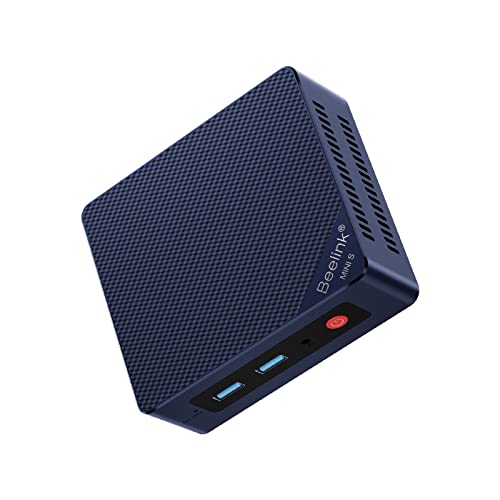
If you’re buying a box for this, the Beelink Mini S13 (N150, 16GB, 500GB, $349 when I checked) is in the class I mean, and my home lab mini PC roundup covers the alternatives.
You also need a microphone and a speaker in the room. Three ways to get them:
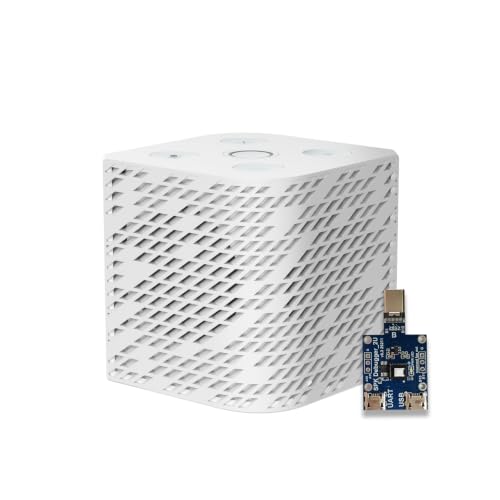
- Home Assistant’s own satellite: the Voice Preview Edition lists a $69 recommended price. The closest thing I found on Amazon was the Third Reality Voice/Music Assistant Dev Edition at $79.99, which comes preloaded with Home Assistant Voice Assistant and Music Assistant and has two microphones and a 3W speaker.
- Build your own: the reSpeaker Lite Voice Assistant Kit ($64.99) is a two-mic board with an XMOS audio chip and a pre-soldered XIAO ESP32-S3, and it runs ESPHome.
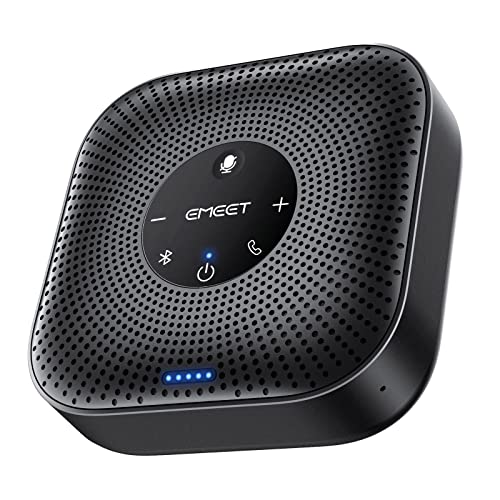
- Skip the satellite: plug a USB speakerphone like the EMEET M0 Plus ($49.99, four mics) into the mini PC itself and run the Open Home Foundation’s linux-voice-assistant on it. That project is still labelled experimental, so budget an evening.
FAQ
Does Kitten-TTS 2 need a GPU? No. The C++ runtime is CPU-only, and on my Mac it beat real time at 8, 12 and 16 threads. CUDA through PyTorch, MLX on Apple silicon and vLLM are separate backends if you do have a GPU.
How much RAM does Kitten-TTS 2 need on CPU? The process peaked between 2.8GB and 3.5GB in every run, depending on decoder and thread count. The README’s own prerequisite is “a CPU with about 6 GB of RAM”.
Is Kitten-TTS 2 better than Piper for Home Assistant? For speed and footprint on a small box, no: Piper was about 90 times faster on a short reply. Kitten-TTS 2 brings things Piper doesn’t, like voice cloning and emotion tags. These timings say nothing about whether I’d prefer its voice to Piper’s.
Can Home Assistant use Kitten-TTS 2 today? Yes, through any Wyoming server that wraps it. There’s no official one yet. The server above worked with Home Assistant 2026.10.4 as a regular TTS entity.
What about Kitten-TTS 0.8? The 0.8 nano and mini models are tiny ONNX models with eight voices. They stayed under two thirds of a second even on the weather sentence at 4 threads, so they’re the realistic Kitten option on a 4-core box.
I’d still like to run the same script on a real N150. I’d bet its 4-thread RTF lands well above 1.38.
Last updated November 2026, with kitten_tts_cpp 0.2.0 and piper-tts 1.8.0.