Ollama has had a tag I kept scrolling past: qwen3.5:9b-mlx. Same model as qwen3.5:9b, 2.3 GB bigger, and the library page says nothing about why you’d want it. I had an evening, the Mac Studio, and a self-imposed rule that nothing I downloaded could be over 10 GB, so I ran one 9B model through every runtime I could install and wrote the numbers down.
On this machine the plain MLX path generates about 38 percent faster than the plain GGUF path with the same model, and Ollama’s own MLX tag sits in between. There’s a catch in how Ollama gets there, and a second one about memory.

TL;DR
- Qwen3.5 9B, 4-bit, Mac Studio M3 Ultra. Generation speed: Ollama GGUF 77.7 tokens/s, llama-bench 77.8, Ollama MLX 90.5, rapid-mlx 105.9, mlx-lm 107.5.
- Ollama’s GGUF path matches llama.cpp on this model, within a tenth of a token per second.
- Ollama loads the GGUF with a 262,144-token context by default and takes 15 GB of memory for a 6.6 GB model. The MLX tag takes 9 GB. mlx-lm peaks at 5.2 GB.
- Ollama’s MLX engine turns on Qwen3.5’s multi-token prediction head automatically since 0.32.6, so its 90 tokens/s is partly speculative decoding, not just the MLX kernels.
- The GGUF blob Ollama downloads will not load in upstream llama.cpp. If you want llama-bench numbers, pull a GGUF from Hugging Face instead.
Why one model and five runtimes
The Mac post from Friday leaned on a claim I’ve been making since the Qwen3.8 27B post: Ollama understates what Apple silicon can do. I wanted to know how much of that is Ollama, how much is GGUF versus MLX, and how much is the model. The way to find out is to hold the model constant and vary only the runtime.
The model is Qwen3.5 9B, because it’s the largest current model that fits my download rule in every format. The Ollama tags, from the qwen3.5 library page:
| Tag | Format | Size |
|---|---|---|
qwen3.5:9b | GGUF Q4_K_M | 6.6 GB |
qwen3.5:9b-mlx | MLX NVFP4 | 8.9 GB |
qwen3.5:9b-mxfp8 | MLX MXFP8 | 11 GB |
qwen3.5:9b-mlx-bf16 | MLX BF16 | 19 GB |
For the non-Ollama runtimes I used mlx-community/Qwen3.5-9B-4bit (6.0 GB on disk) and unsloth/Qwen3.5-9B-GGUF at Q4_K_M (5.28 GiB). Note the quantizations are not identical: Ollama’s MLX tag is NVFP4, the mlx-community build is 4-bit affine, and the two GGUFs are both Q4_K_M. Each runtime has a quantization it steers you toward, and that’s the one I used.
Versions, all installed on the same evening on the same 256GB M3 Ultra:
- Ollama 0.32.13, two minor versions behind the current 0.34
- llama.cpp 0.4.0 from Homebrew, build 5266f24da (10809)
- mlx-lm 0.31.3 and rapid-mlx 0.14.1, both in one isolated Python 3.12 virtual environment made with uv
The prompt for every generation run was the same 34-token request for a 900-word essay on unified memory, with thinking turned off everywhere so the token count is comparable.
The numbers
| Runtime | Weights | Generation | Notes |
|---|---|---|---|
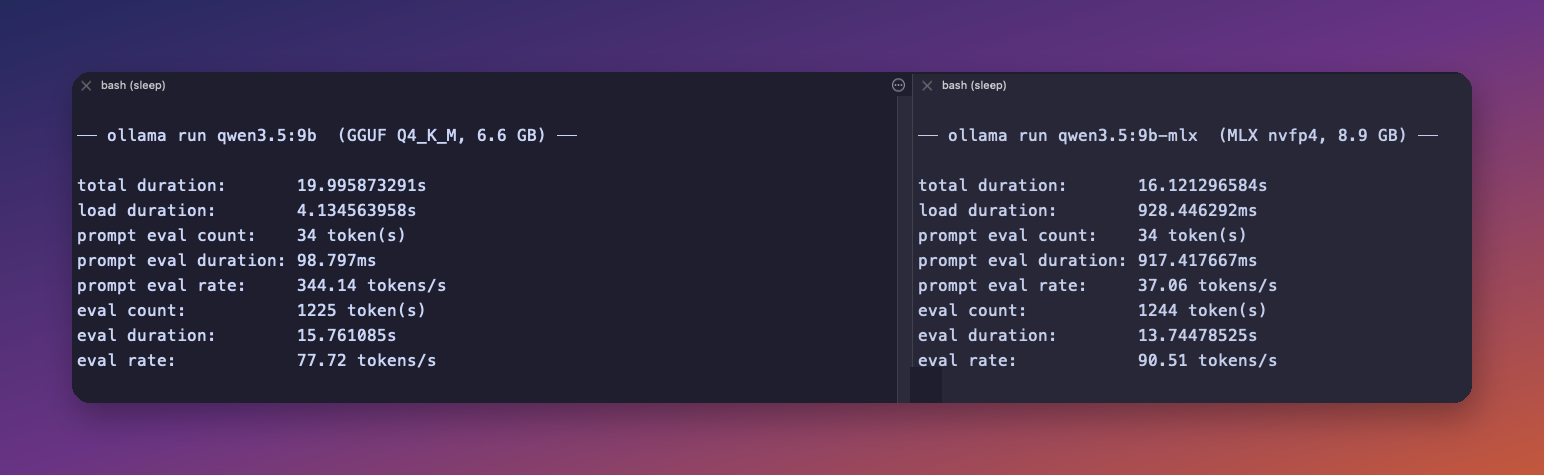
| Ollama 0.32.13, GGUF | qwen3.5:9b, Q4_K_M | 77.7 tokens/s | 1,225 tokens generated, 4.1 s load, 15 GB resident |
| llama-bench, build 10809 | unsloth Q4_K_M | 77.8 tokens/s | tg128, three runs, ±0.11 |
| Ollama 0.32.13, MLX | qwen3.5:9b-mlx, NVFP4 | 90.5 tokens/s | 1,244 tokens generated, 0.9 s load, 9 GB resident, MTP on |
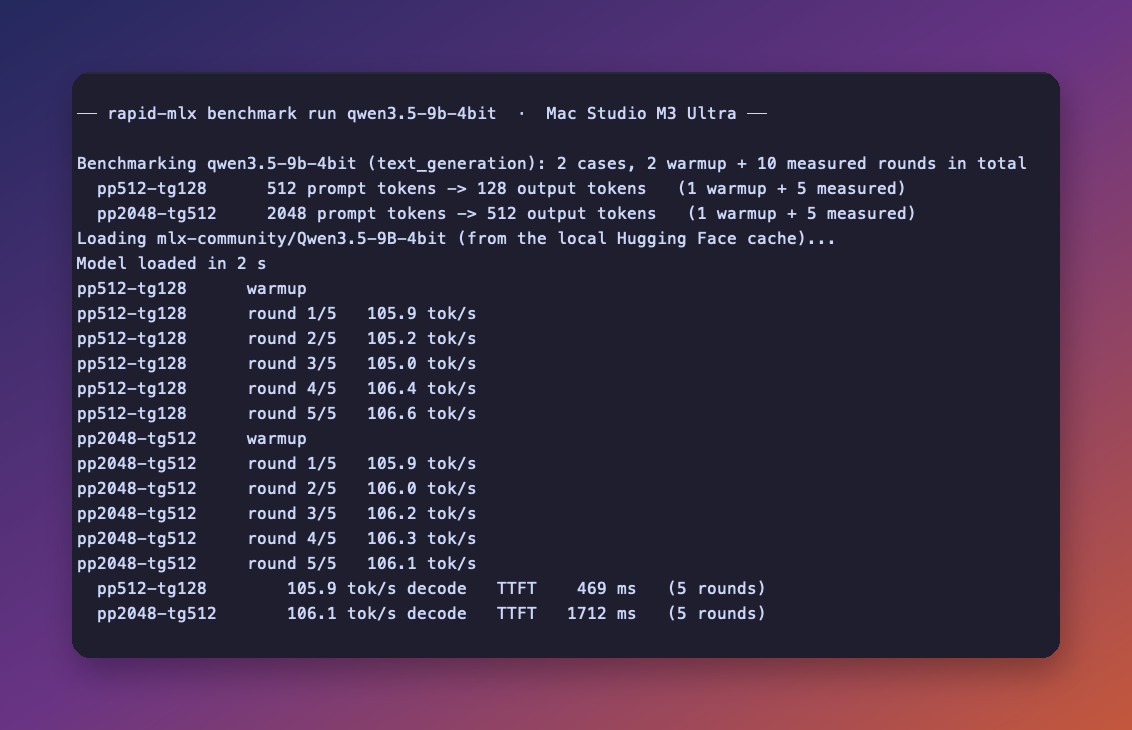
| rapid-mlx 0.14.1 | mlx-community 4-bit | 105.9 tokens/s | pp512-tg128 protocol, five rounds, 469 ms to first token |
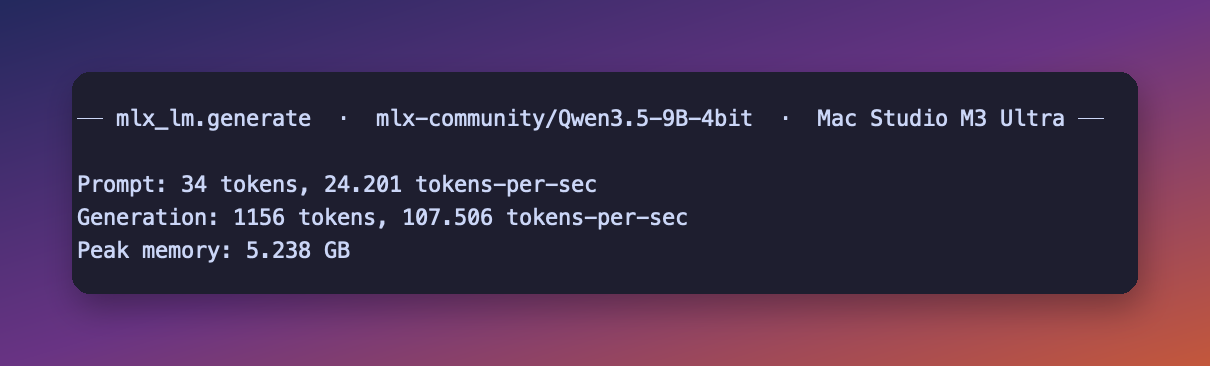
| mlx-lm 0.31.3 | mlx-community 4-bit | 107.5 tokens/s | 1,156 tokens generated, 5.24 GB peak memory |
Two runs of each, and the second run is the one in the screenshots. Run-to-run variation was about a token per second or less for everything except Ollama’s MLX prompt processing, which I’ll get to.
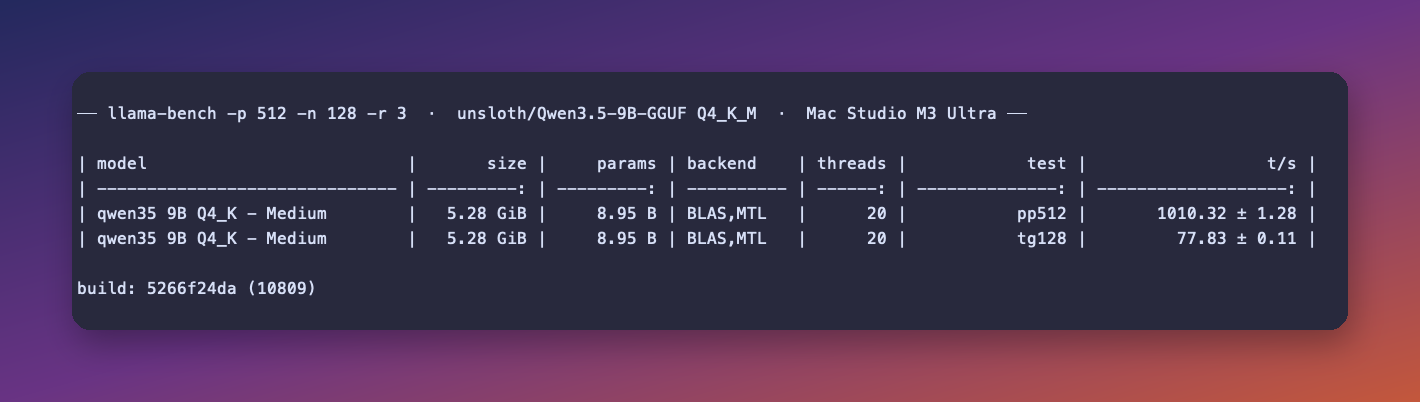
The top two rows surprised me. Ollama’s GGUF path and llama-bench land on the same number, 77.7 versus 77.8, so Ollama runs this model at full llama.cpp speed, at least on generation. The 27B gap I saw in August needs a different explanation than “Ollama is slow at GGUF”.
Then the bottom two rows. Plain mlx-lm, the reference implementation with no server and no tricks, is the fastest thing here at 107.5 tokens/s. rapid-mlx, which is a server built on top of MLX, comes in at 105.9 on its own reproducible protocol, within two percent of mlx-lm. The rapid-mlx README advertises “up to 3× Ollama’s throughput” from a benchmark on an M2 Pro Mac mini. On my machine and this model the honest ratio against Ollama’s GGUF path is 1.36, and against Ollama’s own MLX tag it’s 1.17. The 3× figure in their blog comes from concurrent serving, where a batching server pulls ahead of a single-stream one, and from a different Mac.
A back-of-envelope check
Generation on unified memory is limited by memory bandwidth, because each token has to read the whole set of active weights. The M3 Ultra’s bus is about 800 GB/s. A 5.28 GiB GGUF at 77.8 tokens/s moves about 440 GB/s of weights. A 6.0 GB MLX model at 107.5 tokens/s moves about 645 GB/s. So llama.cpp’s Metal path is using a bit over half the bus and MLX is using about four fifths. Same memory, same model size, different kernels, and MLX’s kernels sit closer to the ceiling. That accounts for the 38 percent gap.
The Ollama MLX twist
Ollama’s MLX tag at 90.5 tokens/s sits between the two camps, and it took a release note to explain why. The 0.32.6 release from early August says: “Qwen3.5 is faster on Apple GPUs: the MLX engine now uses the model’s MTP head for speculative decoding automatically.”
MTP is multi-token prediction. Qwen3.5 ships a small extra head that guesses the next few tokens, the main model verifies them in one pass, and when the guesses are right you get several tokens for the cost of one. Ollama turns it on for you. mlx-lm and rapid-mlx did not use it in the runs above. mlx-lm 0.31.3 has no MTP path yet, and rapid-mlx’s benchmark protocol turns speculative decoding off so the number compares across machines, even though its server has MTP on by default for this model.
So the 90.5 is NVFP4 weights, MLX kernels, and speculative decoding, and it still comes in 17 tokens/s under plain mlx-lm. I don’t know how much of that gap is NVFP4 versus 4-bit affine and how much is Ollama’s serving layer. The prompt side is odd, though. Ollama’s MLX tag processed the 34-token prompt at 37 tokens/s on the second run and 26 on the first, against 344 for its own GGUF path. That’s a fixed startup cost rather than a rate, because rapid-mlx handled 512 prompt tokens in 469 ms and 2,048 in 1.7 seconds on the same MLX weights.
Memory, and the 262K default
On a smaller Mac, memory would decide this for me before speed did. Here’s ollama ps with both models loaded:
NAME              ID              SIZE      PROCESSOR    CONTEXT
qwen3.5:9b-mlx    203e30078279    9.0 GB    100% GPU     262144
qwen3.5:9b        6488c96fa5fa    15 GB     100% GPU     262144
Ollama loads Qwen3.5 with its full 262,144-token context window by default, and on the GGUF path the KV cache for that window costs more than the model itself: 15 GB resident for a 6.6 GB file. The MLX path lands at 9 GB with the same context. mlx-lm, which allocates cache as it goes, peaked at 5.24 GB for the whole run.
On a 256GB machine none of this matters. On a 16GB Mac mini, 5 GB versus 15 GB for the same 9B model decides whether it can run alongside your other software at all. If you’re on Ollama and short on memory, set num_ctx to something you’ll actually use.
The GGUF that won’t leave Ollama
I wanted the llama-bench row to use the exact bytes Ollama downloaded, so I pointed it at the blob in ~/.ollama/models/blobs. Upstream llama.cpp refused it:
llama_model_load: error loading model: error loading model hyperparameters:
key qwen35.rope.dimension_sections has wrong array length; expected 4, got 3
Same error on Homebrew’s 0.3.0 and after upgrading to 0.4.0. Ollama’s bundled llama.cpp and upstream disagree about one metadata key for this architecture, and Ollama’s converter wrote the file for its own fork. The unsloth GGUF from Hugging Face loaded first try, which is why the llama-bench row uses it. An Ollama pull is not a portable GGUF, even though the file starts with the same four bytes (yes, I checked with head -c 4, which is the level of debugging I’m capable of at midnight).
Picking one
For the fastest single-stream generation on a Mac, mlx-lm wins, and the setup is pip install mlx-lm plus an mlx-community repo name. You lose Ollama’s model registry and one-line install. You get 38 percent more tokens per second at a third of the memory.
rapid-mlx is the version of that for people who want a server other apps can talk to. It came within two percent of mlx-lm on generation and speaks the OpenAI API. Telemetry is opt-in and benchmark results stay on disk unless you run a separate share command; I passed --no-telemetry anyway.
Staying on Ollama is fine too, as long as you pull the -mlx tag. That costs 2.3 GB more on disk, saves 6 GB of memory, runs 16 percent faster, and speculative decoding switches on by itself for models that ship an MTP head.
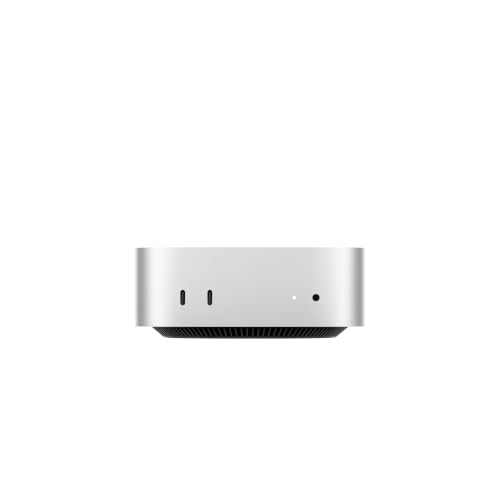
All of this matters most on a machine like the M5 Pro Mac mini at 307 GB/s, because at that bandwidth every one of these percentages shows up as time spent watching tokens arrive. On a Mac Studio M5 Max or my M3 Ultra, the 9B is fast on every runtime and the choice is about memory and workflow.
FAQ
Is Ollama slower than llama.cpp on a Mac? Not on this model. Ollama’s GGUF path and llama-bench both generated Qwen3.5 9B at 77.7 to 77.8 tokens/s on my M3 Ultra. The 27B Ollama-versus-llama-bench gap from my August testing needs a fresh look, and I’ll post it when I have it.
Is the Ollama MLX tag worth pulling? Yes, on Apple silicon. It was 16 percent faster than the GGUF tag, used 6 GB less memory at the default context, and Ollama enables Qwen3.5’s MTP speculative decoding on it automatically.
Why is mlx-lm faster than rapid-mlx? By two percent, and rapid-mlx’s benchmark protocol runs without speculative decoding so results compare across machines. rapid-mlx is a server, and the two percent is what the serving layer costs. With MTP enabled its own README claims more, but that’s a different measurement.
Can I benchmark Ollama’s downloaded GGUF with llama-bench? Not for Qwen3.5, as of Ollama 0.32.13 and llama.cpp build 10809. Upstream rejects the blob’s rope metadata. Download the same quantization from Hugging Face instead.
Resources
- Ollama qwen3.5 tags and the 0.32.6 release notes that turned on MTP for Qwen3.5
- The two Hugging Face repos linked above, mlx-community/Qwen3.5-9B-4bit and unsloth/Qwen3.5-9B-GGUF
- rapid-mlx on PyPI and its Ollama comparison on an M2 Pro
- On this site: Qwen3.8 27B on the M3 Ultra, Mac mini alternatives for local LLMs, and the local LLM mini PC guide
Some links above are Amazon affiliate links. If you buy through them, this site earns a small commission at no extra cost to you.
I’m keeping the mlx-lm environment around. Ollama stays installed for the models it has and MLX doesn’t, which is still most of them.
Last updated: September 2026