Two unauthenticated remote code execution disclosures landed five days apart, and both of them hit software people run at home. Plex2Shell went public on October 16 and Plex says it’s being “actively and widely exploited” against internet-facing servers. PHP2Shell followed on October 21, with a CVSS 9.2 rating and a release note from php.net that said, more or less, update now. Nextcloud and FreshRSS are both PHP apps, and both are in my home stack, so before I read a single hot take I wanted to know which PHP is actually inside those containers.
The quickest way to find out was to ask the containers themselves. I pulled 11 popular PHP images onto my Mac Studio and checked each one. The :latest tags were fine. Two of the pinned tags weren’t.
TL;DR
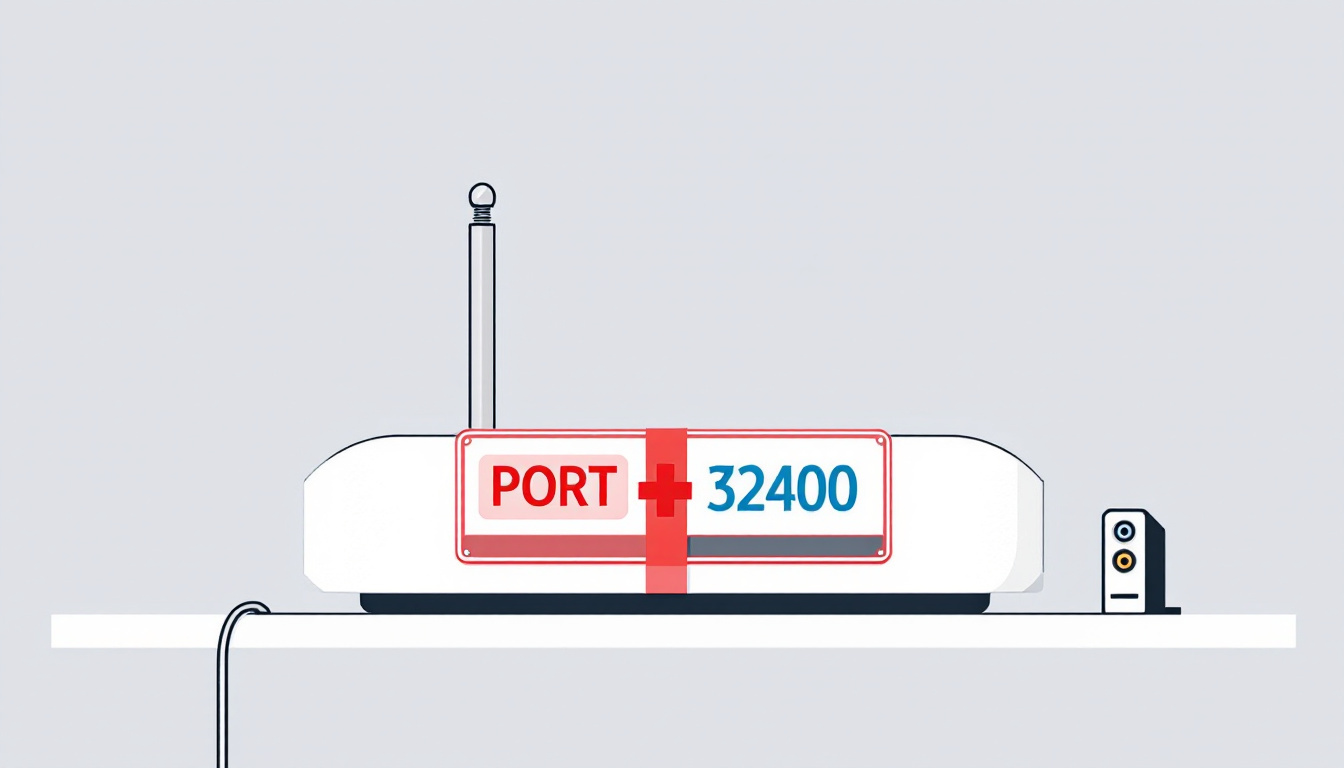
- Plex: anything older than Media Server 1.43.3.10861 that’s reachable from the internet should be assumed possibly compromised, per Plex itself. Update, then turn off Remote Access if you don’t need it.
- PHP: the fixed releases are 8.5.12, 8.4.27, 8.3.36 and 8.2.35. Every
:latestimage I checked had them. A Nextcloud tag pinned to35.0.1-apachestill shipped 8.5.11, and31-apache, last built in March, shipped 8.3.30.- Close inbound ports, including the ones Docker opened behind your firewall’s back. Bind published ports to
127.0.0.1.- Reach your services over WireGuard, Tailscale or Headscale instead of port forwards.
- If your router is the weak link, an N150 box with four 2.5GbE ports running OPNsense costs $258 barebone at the time of writing.
Plex2Shell and PHP2Shell, in the order they hit
Plex2Shell (October 16). The researcher behind it, zmain, published the full chain: an SSRF in the companion /player/timeline endpoint that accepted any token value, a loopback-only plugin API reached through that SSRF, a URL prefix check that handed the owner’s admin token to 127.0.0.1.<attacker>.sslip.io, and finally the transcoder writing an attacker-controlled .so file into the Codecs folder, which Plex then loads. Four CVEs (CVE-2026-96652, -96654, -96655, -96656), reported in July, fixed in Media Server 1.43.3, disclosed in October with a proof of concept.
Plex’s own update on October 19 doesn’t soften anything. Compromised servers were running crypto miners and proxy software, and “if your server is older than 1.43.3.10861 and reachable from the internet, assume it may be compromised.” Their signs of compromise are worth a minute of your time even if you updated:
- Processes started by Plex with names like
myawesomeproxy,mylovelyminerorx12345 - Unfamiliar
.soor.dllfiles in the Plex Codecs folder - Outbound connections to
proxystream.st, or high CPU while nothing’s playing
If you find any of those, Plex says to rebuild from a clean install, sign out all devices, change your password, and treat anything the Plex service account could reach as exposed.
PHP2Shell (October 21). PHP shipped 8.5.12, 8.4.27, 8.3.36 and 8.2.35 to fix two bugs: CVE-2026-109618 (out-of-memory handling leaves request data half-initialized) and CVE-2026-109619 (state from a freed request survives into the next one on the same worker). The advisory lists PHP-FPM, Apache with mod_php, php-cgi, FrankenPHP and LiteSpeed as at risk, and calls mod_php the highest risk because the demonstrated exploit fires before any application code runs.
The release itself was messy. The PHP Foundation’s write-up covers the leak of the CVE IDs on October 20 (with a wrong 10.0 score), the release moving up a day, and Chainguard publishing patched images more than six hours before the coordinated release. Amazon’s threat intelligence team found an exploitation attempt against its MadPot honeypots dated October 17, four days before disclosure, and says to start any investigation from that date.
Elias Taylor went through the most-starred public PoCs and found most of them lean on a local file inclusion bug the server already has, which is a big head start to hand an attacker. That matches my read: PHP2Shell is harder to pull off than Plex2Shell, and Amazon itself says it’s unclear whether the attempts it saw would have worked on real systems. I’d still patch today.
I checked the PHP inside 11 Docker images
Reading advisories doesn’t tell you what’s running. The PHP version lives inside the image, and the only way I trust it is to ask PHP directly. This loop prints each image’s build date, its bundled PHP version, and whether session upload progress is on (turning it off is one of PHP’s listed mitigations for CVE-2026-109619). Every container runs with --network none and gets deleted on exit, so nothing listens anywhere.
#!/bin/bash
# Usage: bash phpcheck.sh nextcloud:latest wordpress:latest ...
# Prints build date, bundled PHP version and session.upload_progress for each image.
# --network none: no network at all. --rm: container is removed on exit.
for img in "$@"; do
  built=$(docker image inspect -f '{{.Created}}' "$img" | cut -c1-10)
  docker run --rm --network none --entrypoint php "$img" \
    -r 'printf("%-38s %s  PHP %-7s upload_progress=%s\n", $argv[1], $argv[2], PHP_VERSION, ini_get("session.upload_progress.enabled") ?: "0");' "$img" "$built"
done
Here’s the output from my M3 Ultra Mac Studio on October 24, after a fresh docker pull of each tag:
nextcloud:latest                       2026-10-23  PHP 8.5.12  upload_progress=0
nextcloud:35.0.1-apache                2026-10-06  PHP 8.5.11  upload_progress=1
nextcloud:32-apache                    2026-10-23  PHP 8.3.36  upload_progress=0
nextcloud:31-apache                    2026-03-16  PHP 8.3.30  upload_progress=1
wordpress:latest                       2026-10-21  PHP 8.3.36  upload_progress=1
lscr.io/linuxserver/nextcloud:latest   2026-10-21  PHP 8.5.12  upload_progress=1
freshrss/freshrss:latest               2026-10-21  PHP 8.4.27  upload_progress=1
lscr.io/linuxserver/bookstack:latest   2026-10-21  PHP 8.5.12  upload_progress=1
fireflyiii/core:latest                 2026-10-21  PHP 8.5.12  upload_progress=1
lscr.io/linuxserver/grocy:latest       2026-10-21  PHP 8.5.12  upload_progress=1
matomo:latest                          2026-10-22  PHP 8.4.27  upload_progress=1
Nine of the 11 have a fixed PHP. The official Nextcloud images rebuilt on October 23 also switched upload progress off, which lines up with the php.net mitigation advice. php.net then followed up on October 23 suggesting session.upload_progress.enabled=0 for everyone until the next bugfix release. It blocks a separate and unlikely RCE path (CVE-2026-115560). The seven patched images that still show upload_progress=1 are worth that one-line ini change too.
Here are the pinned Nextcloud tags side by side:
| Tag | Built | PHP | Fixed release for that branch | Status |
|---|---|---|---|---|
nextcloud:35.0.1-apache | 2026-10-06 | 8.5.11 | 8.5.12 | Vulnerable |
nextcloud:31-apache | 2026-03-16 | 8.3.30 | 8.3.36 | Vulnerable |
nextcloud:32-apache | 2026-10-23 | 8.3.36 | 8.3.36 | Fixed |
nextcloud:latest | 2026-10-23 | 8.5.12 | 8.5.12 | Fixed |
Both are pinning traps. On Docker Hub, 35.0.1-apache was last pushed on October 10 while 35-apache was pushed on October 23, so anyone pinned to the exact point release never got the new PHP. And 31-apache was last pushed on March 19, even though 32-apache got a fresh build on October 23. Pinning to an exact version feels responsible, but the base image underneath stops moving with it.
Pin to a major tag that’s still being built, like nextcloud:35-apache, and run the loop above after any big CVE week.
Close the ports you forgot about
The Plex chain only works if the attacker can talk to port 32400, and Plex’s advice says as much: if you don’t need remote access, turn it off under Settings > Remote Access, and avoid forwarding 32400 directly.
The router comes first. Every rule on its port forwarding page should have a reason you can say out loud, and anything you can’t explain gets deleted. UPnP deserves a look too, because it lets apps on your network open ports without asking you.
Docker is sneakier. Docker’s docs say it plainly: publishing a port is “insecure by default” and binds to every host address unless you say otherwise. On Ubuntu it also routes around ufw, so the firewall you think is protecting the host never sees that traffic. The fix is one IP address in front of the port:
services:
  nextcloud:
    image: nextcloud:35-apache   # a major tag that still gets rebuilt
    ports:
      - "127.0.0.1:8080:80"      # host-only; a reverse proxy on this host fronts it
If there’s no reverse proxy on the box, bind to the host’s LAN or VPN address instead (for example 192.168.1.20:8080:80) so only machines on that network can reach it. A bare 8080:80 publishes to every interface, so leave that form out.
I ran the same binding on the Mac to confirm what Docker records:
$ docker run -d --name tb-bind-demo -p 127.0.0.1:18080:80 nextcloud:latest
$ docker port tb-bind-demo
80/tcp -> 127.0.0.1:18080
$ docker inspect -f '{{json .HostConfig.PortBindings}}' tb-bind-demo
{"80/tcp":[{"HostIp":"127.0.0.1","HostPort":"18080"}]}
$ curl -s -o /dev/null -w "%{http_code}\n" http://127.0.0.1:18080/status.php
200
$ docker rm -f tb-bind-demo
To audit a running server, this lists every container with its published ports. Anything showing 0.0.0.0 or [::] is listening on all interfaces:
# Every running container and its published ports
docker ps --format 'table {{.Names}}\t{{.Ports}}'
VPN-only access with WireGuard, Tailscale or Headscale
Once nothing’s forwarded, you need a way back in. All three of these give you one, and the difference is mostly who runs the coordination and whether you open a single port.
| Option | Inbound port on your router | Who runs the control plane | Cost | Good fit |
|---|---|---|---|---|
| WireGuard on the router or firewall | One UDP port (usually 51820) | You | $0 | You control the router |
| Tailscale | None | Tailscale | Free Personal plan, up to 6 users | Family phones, CGNAT |
| Headscale + Tailscale clients | One, on the Headscale host | You | $0 plus a host | You want Tailscale’s ease without the account |
| WireGuard on a cloud VM | None at home | You | $0 on Oracle’s free tier | CGNAT, or you can’t touch the router |
WireGuard is what I’d pick if you own the router. It’s one UDP port, and the protocol doesn’t even answer a client it can’t authenticate, so a scanner hitting that port sees nothing. That’s a very different exposure from a web app on 443 or a media server on 32400.
Tailscale uses WireGuard underneath and connects devices through NAT without any port forwarding. The Personal plan is free with unlimited devices and up to 6 users, which covers most households.
Headscale is an open source, self-hosted version of the Tailscale control server. You keep the regular Tailscale apps (Headscale supports the last 10 client releases on Linux, Windows, macOS, iOS and Android) and drop the dependency on their login service. The trade is one more thing to run and patch.
If you’re behind carrier-grade NAT and can’t forward anything, a VPS can be the meeting point. My free Oracle ARM box runs a WireGuard VPN (I mentioned it in the free tier changes post), and the setup guide is here. For a laptop that only needs a few services, sshuttle over plain SSH needs nothing on the server beyond SSH and Python 3.
My wife uses Audiobookshelf daily through SoundLeaf, so whatever sits in front of it has to keep working when her phone hops between home Wi-Fi and mobile data. Test that on every family phone before you close the old port.
A $258 N150 box as the firewall
Everything above assumes the router does what you tell it. Consumer routers are where I trust the firmware least, and TP-Link is the loudest example right now. Ars Technica reports that TP-Link still has no exemption from the FCC’s ban on routers made outside the US, can’t sell its latest Wi-Fi 8 routers there, and now faces lawsuits from Florida, Montana, Iowa and Nebraska. TP-Link disputes the claims. Models approved before the ban can still be sold, and the ban is about selling new hardware, so routers in people’s homes aren’t touched by it. If I were redoing my network this week, I’d put OPNsense on a separate small box and leave the old router doing nothing but Wi-Fi.
The usual homelab answer is a small fanless box with several Intel 2.5GbE ports running OPNsense. The OPNsense recommended spec is a 1.5 GHz multi-core CPU, 8 GB of RAM and a 120 GB SSD. The N150 is a quad-core chip (the Glovary and Healuck listings quote up to 3.6 GHz), so the RAM and SSD you add are what decide whether you hit that spec. These are the ones I’d look at:
| Box | Ports | RAM / storage | Price (Oct 24) |
|---|---|---|---|
| Ayemlpoi N150 | 4 x 2.5GbE i226-V | Barebone (DDR4) | $258.00 |
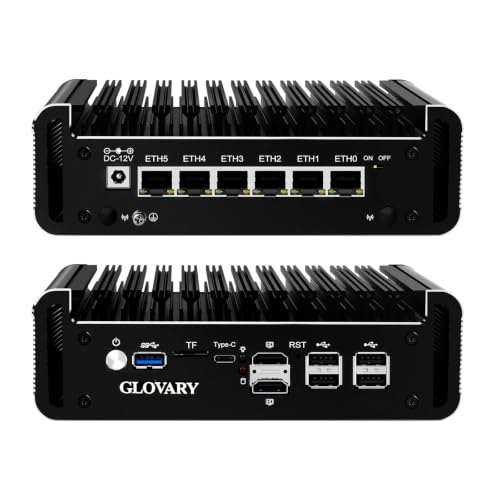
| Glovary N150 | 6 x 2.5GbE i226-V | Barebone (DDR5, 2 x M.2) | $349.96 |
| Healuck N150 | 4 x 2.5GbE i226-V | 8 GB DDR4, 128 GB SSD | $429.98 |
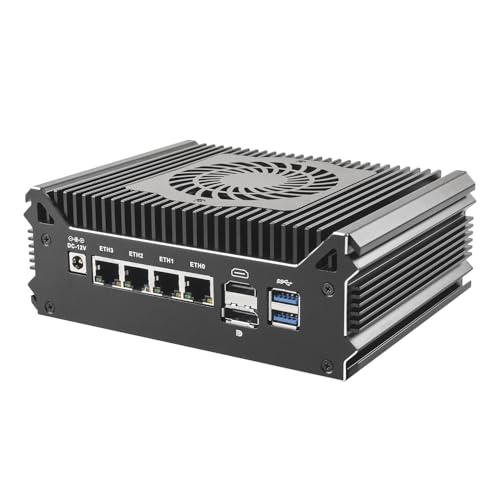
- Cheapest that does the job: the Ayemlpoi N150 with four 2.5GbE ports. It’s barebone, so budget for DDR4 RAM and an SSD on top.
- More ports for VLANs: the Glovary N150 with six i226-V ports gives you room for a separate IoT or DMZ port. Also barebone, and it takes DDR5.
- Ready to install: the Healuck N150 with 8 GB and 128 GB costs more but meets the OPNsense recommended spec out of the box.
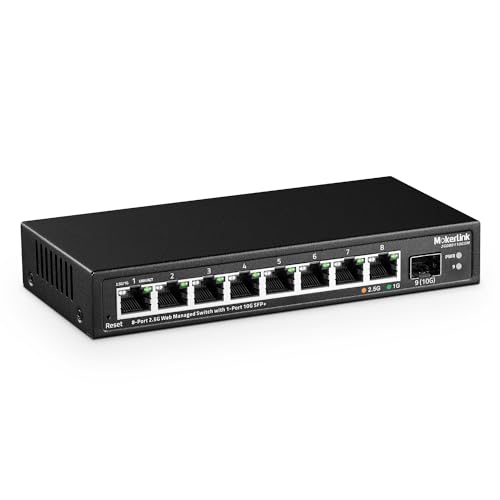
Your current router doesn’t have to go in the bin. If it has an access point mode, put it behind the new box and it keeps doing Wi-Fi while OPNsense handles the firewall, DHCP and the VPN. WireGuard lives under VPN > WireGuard > Instances, and the road warrior how-to walks through the server side and the phone peer. If you want the IoT gear on its own VLAN, you’ll also need a managed switch. The MokerLink 8-port 2.5G managed switch at $79.68 does VLANs and keeps every port at 2.5GbE, which matches the firewall.
Not ready to replace the router? The GL.iNet Brume 2 (GL-MT2500A) is an $89.99 wired box that runs a WireGuard server behind whatever router you have. GL.iNet lists WireGuard at up to 355 Mbps, plenty for streaming Jellyfin to a phone, and you only forward its one UDP port.
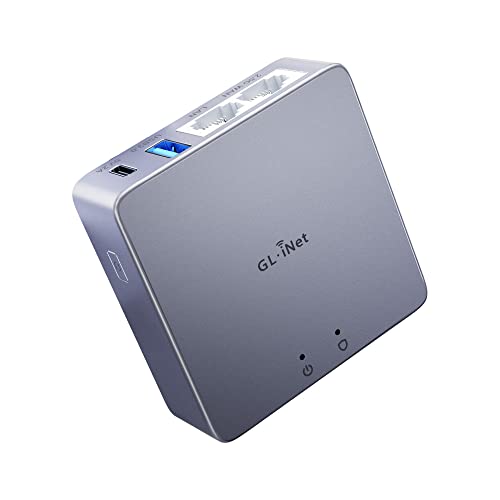
A nicer consumer router would also work. The OPNsense box gives you updates on your schedule and logs you can actually read, and to me that’s worth the setup time. If you’re still picking the server side, my home lab mini PC roundup covers the boxes that run the services themselves.
Update discipline for weeks like this one
Even with everything behind the VPN, install the updates now. My checklist so the next CVE week passes without drama:
- Subscribe to the sources that ship the fix. The php.net news archive posted the advance notice a day before the release. Plex posts its security notices and CVE details in its forum thread.
- Pin to major tags that still get builds, and check the build date (
docker image inspect -f '{{.Created}}') when a base-image CVE drops. - Check the version you’re actually running, not the one you think you pulled. For Plex that’s Settings > General. For PHP apps, the loop above.
- Keep a list of what’s exposed. If the list is empty because everything’s behind the VPN, even better.
If Plex2Shell is the last straw for Plex, Jellyfin 12 on a mini PC is the setup I wrote up last month. It still needs patching, but it doesn’t need an account server to let you watch your own files.
FAQ
Is my Plex server affected by Plex2Shell?
If it’s older than Plex Media Server 1.43.3.10861, yes. Check under Settings > General in Plex Web. If it was older than that and reachable from the internet, Plex says to assume it may be compromised and to look for unknown processes, odd .so or .dll files in the Codecs folder, and traffic to proxystream.st.
Do I still need to patch PHP if Nextcloud is only reachable over a VPN?
Yes. A VPN cuts the number of people who can reach the app down to you and your devices, but a compromised laptop or a shared link can still get in. Update to 8.5.12, 8.4.27, 8.3.36 or 8.2.35, and check what your image actually ships.
Is opening a WireGuard port as risky as forwarding Plex?
No. A WireGuard server doesn’t respond to packets from clients it can’t authenticate, so there’s no login page or API to attack. A forwarded Plex or web port answers anyone who connects.
Is Tailscale free for a homelab?
The Personal plan is free with unlimited devices and up to 6 users. If you’d rather not depend on Tailscale’s coordination server, Headscale runs that part yourself and works with the regular Tailscale apps.
Will my TP-Link router stop working because of the FCC ban?
No. The ban covers sales of new routers made outside the US, and models approved before it can still be sold. Keep the firmware updated, or move it to access point mode behind a firewall you control.
Resources
- Plex: security update and exploitation notice
- PHP: security advisory, October 21
- Docker: port publishing and the 127.0.0.1 binding
- OPNsense: WireGuard road warrior setup
- On this site: free WireGuard VPN on Oracle Cloud, what a mini PC at home really costs
Some links above are Amazon affiliate links. If you buy through them, this site earns a small commission at no extra cost to you.
Pinned Nextcloud to an exact tag like 35.0.1-apache? Run that loop on it tonight. 🔒
tb
Last updated: October 2026