I got about ten minutes into the Gamers Nexus video before I opened a new tab and started pricing mini PCs. Gamers Nexus, Level1Techs and a few independent security researchers put retail LG OLEDs behind packet captures, and what came out is ugly: the TVs scan your Wi-Fi for phones and smartwatches, log ambient audio in standby, and fingerprint whatever is playing over HDMI so LG Ad Solutions knows what you watched. LG says the reports are misleading. Either way, a $280 box behind the TV takes the question off the table.
That fix is a fanless N150 mini PC running Jellyfin 12, which shipped on September 7 with a version-number jump, a database rewrite, and native book support. I ran the 10.11 to 12 upgrade in Docker to see what “first boot rewrites your database” actually looks like, and I have the numbers below.
TL;DR
- Take the TV off the network for good and feed it one HDMI cable from a mini PC. The TV apps, and the ad platform behind them, go with it.
- Jellyfin 12.0 (September 7, 2026) is the version to build on: faster library database, books and comics without a plugin, the Modern layout by default, and a stack of security fixes.
- The upgrade on my test library ran 31 migrations and answered
/healthin 8 seconds. Idle RAM dropped from 235 MiB on 10.11 to 170 MiB on 12.0, and lower once it settled.- An Intel N100 or N150 box handles 4K HEVC 10-bit through Quick Sync. Budget $240 to $360 depending on RAM and brand, more if you want fanless.
- Add a $13 air-mouse remote and, if you want the TV remote to drive it, a USB-CEC adapter.
What Gamers Nexus actually found (and what LG says back)
The Verge’s write-up of the investigation is the calmest summary. Three findings matter for anyone with a TV on their network:
- LAN scanning: packet captures showed the TVs enumerating nearby hardware (phones, watches), logging location data and neighbouring Wi-Fi networks, and sending it to LG Ad Solutions.
- Standby audio: the sets could record microphone audio while in standby. Disconnecting from the internet didn’t stop it; the audio was stored locally and uploaded once the TV came back online.
- Automatic Content Recognition: the TV samples audio and video across every input, including HDMI, to work out what you’re watching. RTINGS has shown that ACR is standard across nearly every smart TV brand, so this is bigger than one manufacturer.
LG’s response, on September 12, was that its TVs “do not continuously record or transmit users’ conversations,” that wake-word detection runs locally, and that ACR, voice recognition and interest-based ads are optional and off by default. The Verge’s follow-up points out that “continuously” is carrying a lot of weight in that sentence, given the logs Gamers Nexus played back. The Gamers Nexus video hit the Hacker News front page with over a thousand comments, and the most-repeated advice in that thread was the same as mine: don’t give the TV a network.
I’m not going to litigate who’s right. An offline TV can’t upload anything, and a mini PC on HDMI gives you every feature the TV apps had, minus the ad platform.
Why a mini PC and not a streaming stick
An Apple TV or a Fire Stick would also get the TV offline, and for a lot of people that’s enough. I wanted the server side too. A stick runs someone else’s OS with someone else’s telemetry, and it can’t host anything. A mini PC is the server and the client in one box.
- Your library lives on it, it does the transcoding, and every phone and tablet in the house points at it.
- An HDMI cable to the TV and the Jellyfin web client full-screen is the whole player. There’s no app store to lose access to.
- The same box can host the retro game library from my RomM post, Pi-hole, or a Minecraft server alongside Jellyfin.
- An N100 or N150 box idles around 6 to 10 W at the wall, which is the reason I moved my home services onto mini PCs in the first place.
Plex users have their own reason to look at this right now. In the first week of September, Plex urged everyone to update immediately to Media Server 1.43.3 to close multiple security holes, and selfh.st reported the following week that over 36,000 servers still hadn’t patched. Jellyfin 12 ships security fixes of its own, so this isn’t a Plex-only problem, but the Jellyfin fixes at least arrive without a subscription prompt.
Jellyfin 12: what changed, and what the upgrade really does
The headline is the version number. What would have been 10.12.0 is now 12.0.0, because the team got tired of 10.11.0 rewriting the entire library database while looking like a point release. If you pin a container tag or parse the version string anywhere, that’s your first thing to fix.
Under the hood, 12.0 finishes what 10.11 started:
- Playlists and collections are real rows now. Before, a playlist was one big blob the database couldn’t look inside. Every item is its own row, so paging, counts, and single-item edits stop loading the whole list.
- Books and comics without the Bookshelf plugin. OPF and ComicInfo metadata, EPUB and comic-archive posters, PDF page counts and audiobook chapters all moved into the server, with a new OpenLibrary plugin for metadata and cover art. Bookshelf itself is deprecated.
- Multiple versions for episodes. A 1080p and a 4K copy of the same episode finally group the way movies always did, with resume data that follows the version you watched.
- Modern layout is the default on desktop and mobile. TV clients keep the old TV layout for now.
- Security fixes: path traversal via crafted requests, re-running the setup wizard without signing in, unsafe plugin package names, and XSS in the web client.
The upgrade checklist the release notes shout at you
The 12.0 post has a TL;DR in bold caps for a reason. The migration rewrites the database on first boot, so:
- Stop Jellyfin and take a full manual backup of the config and data directories. The backup is the only way back.
- Be on 10.10.7 or any 10.11.x first. Anything older goes to 10.10.7 before 12.
- Check usernames. They’re case-insensitive now, and two accounts that differ only by capitalisation will fail the migration.
- Remove third-party plugins built for 10.11. They won’t load.
- Expect a full library scan afterwards. Auto-grouped alternate versions are cleared and rebuilt from disk, and the first scan is slower than usual.
What it looked like on my test box
I built a 10.11.11 container with a tiny library (two public-domain films, two Project Gutenberg EPUBs) and pointed a jellyfin/jellyfin:12 container at the same config volume.
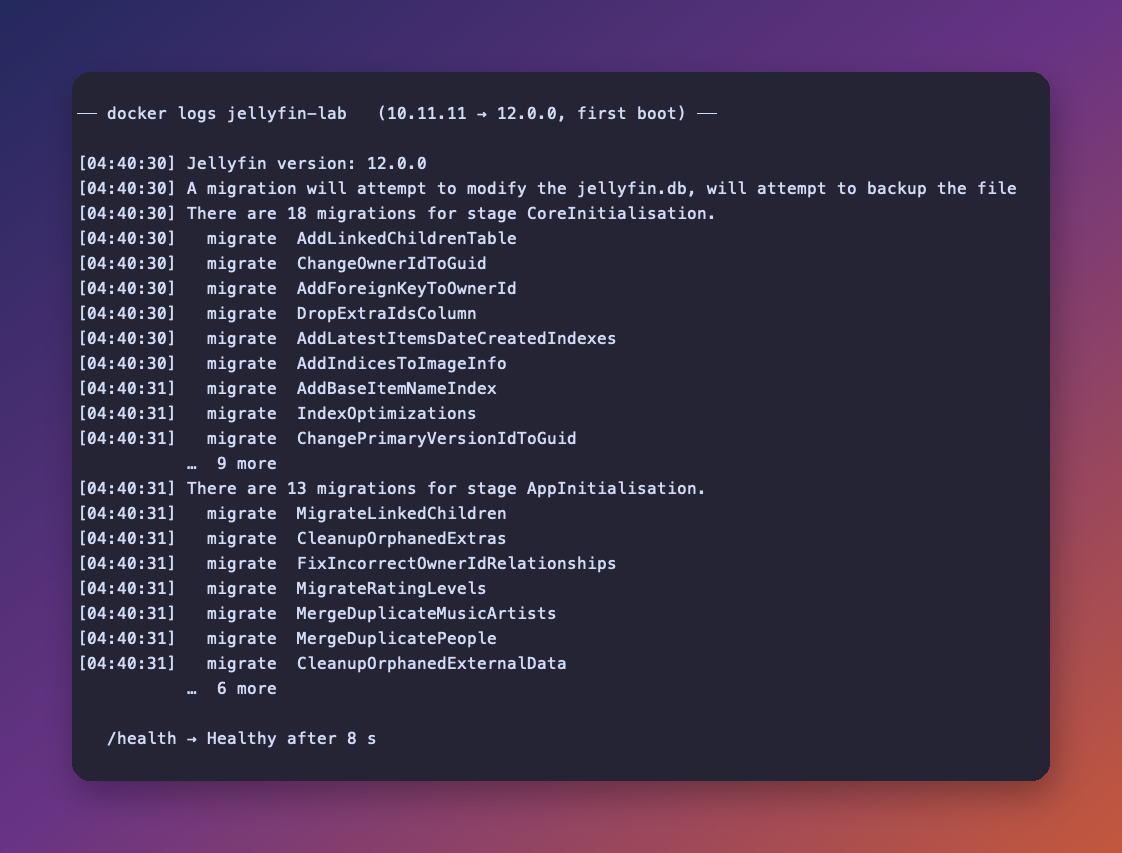
Eighteen migrations in the CoreInitialisation stage, thirteen more in AppInitialisation, a jellyfin.db backup taken before any of them, and /health returned Healthy eight seconds after docker run. That’s a four-item library, so it proves the machinery works and says nothing about how long a 40,000-episode archive takes. For a big library, the notes offer --mode MigrateSystem so the migration runs on its own and exits before the server starts serving.
The other number I wanted was memory. Same library, same host, each container left to settle for twenty seconds before the snapshot:
| Version | Idle RAM (docker stats) | CPU at idle |
|---|---|---|
| 10.11.11 | 235 MiB | 0.6% |
| 12.0.0 | 170 MiB | 0.03% |
Left alone for a few more minutes, the 12.0 container settled lower still, which is the capture below.

I also ran btop inside a sidecar container sharing Jellyfin’s process namespace, on an 8-core, 8 GB Docker VM. Jellyfin was the only real process in the list, holding 280 MB resident and 0.4% of a core.
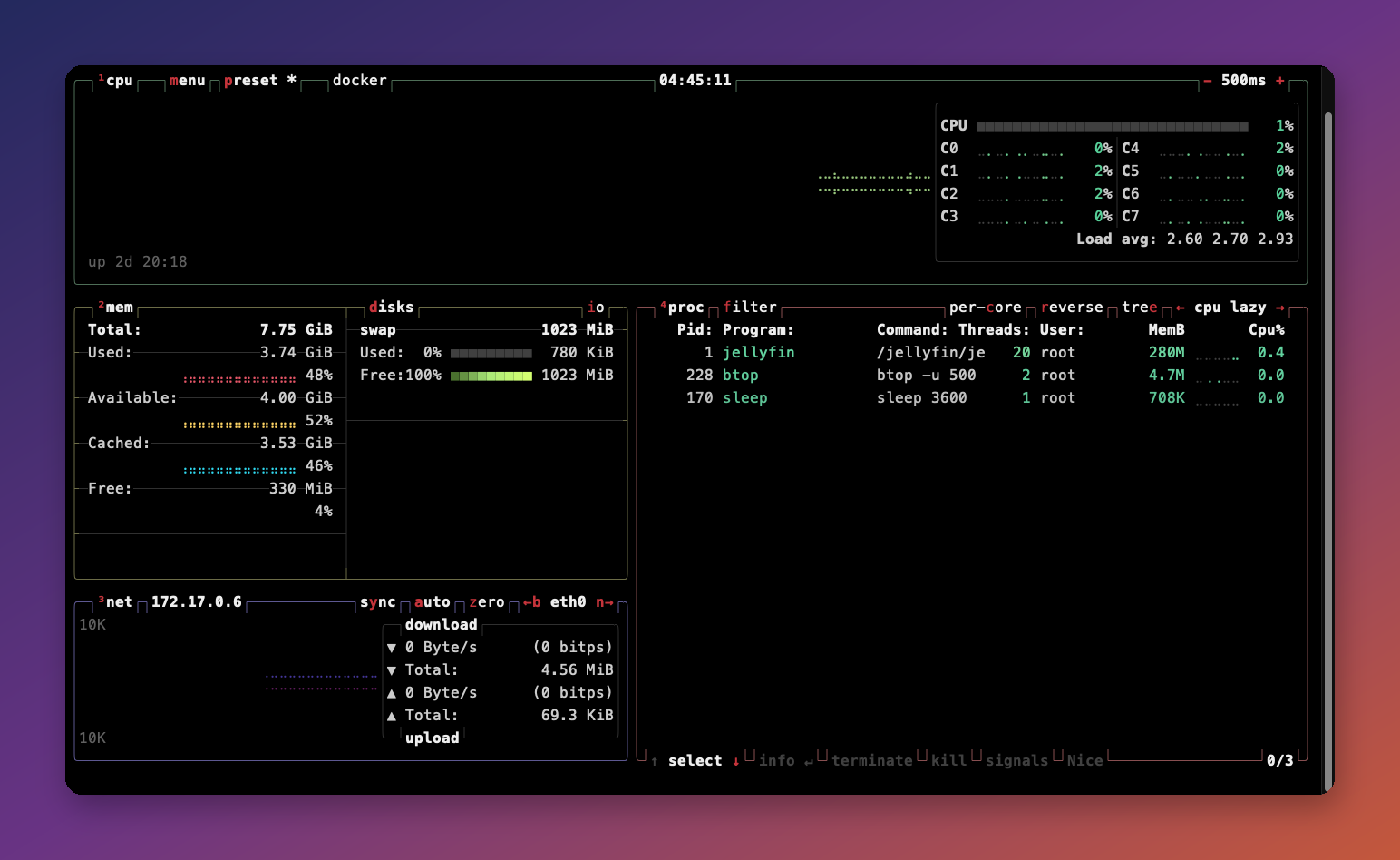
The test ran on my Mac Studio because that’s where Docker already lives. The container numbers carry over to an Intel box. Transcoding numbers wouldn’t, because Docker on macOS has no Quick Sync, which is why the hardware section below leans on Jellyfin’s own codec tables instead of my CPU graph.
The mini PC: N100, N150, or step up
Jellyfin’s Intel hardware acceleration docs are the source of truth here. Any Intel iGPU with Quick Sync decodes and encodes H.264. HEVC 10-bit, which is what your 4K HDR rips are, needs Gemini Lake or newer on the low-power side, so every N100 and N150 qualifies. AV1 decode arrives with Gen 12 graphics, which the Alder Lake-N and Twin Lake chips have; AV1 encode needs an Arc GPU or Meteor Lake and newer, which none of these boxes have.
| Box | CPU | RAM / SSD | Price (Amazon, Sept 2026) | Who it’s for |
|---|---|---|---|---|
| PELADN N100 | Intel N100 | 8 GB / 256 GB | $239.99 | Cheapest way in. Direct-play household, few transcodes. |
| KAMRUI Essenx E1 | Intel N150 | 16 GB / 256 GB | $279.00 | The one I’d buy. 16 GB leaves room for Pi-hole, RomM and friends. |
| Beelink Mini S12 Pro | Intel N100 | 16 GB / 500 GB | $339.00 | The safe pick. Boring, well supported, bigger SSD. |
| Beelink Mini S13 | Intel N150 | 16 GB LPDDR5 / 512 GB | $359.00 | Same idea, newer chip. One gigabit port on this SKU, so no 2.5 GbE. |
| MeLE Quieter4C | Intel N150 | 16 GB / 512 GB | $549.99 | Fully fanless. Pay for silence if the box sits in the bedroom. |
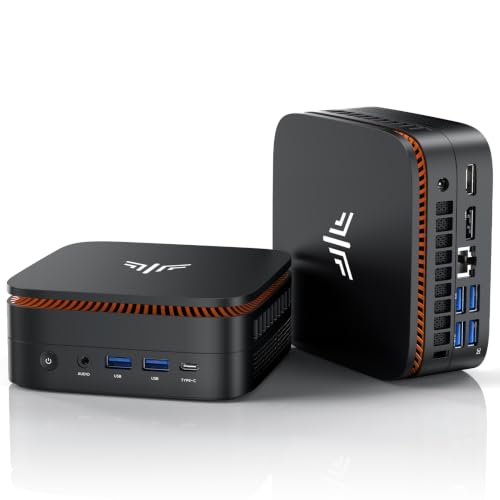
The N150 is a Twin Lake refresh of the N100: same four cores, a slightly higher boost clock, same Quick Sync block. Between the two I’d pick on RAM and price, not the chip. Sixteen gigabytes matters more than the extra 200 MHz once other containers start piling up next to Jellyfin.
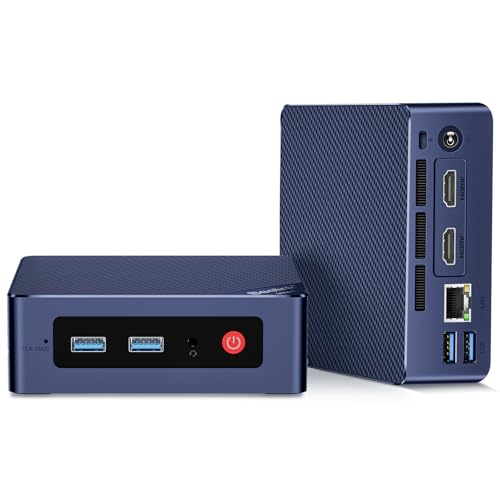
For the media itself, an external USB drive or a NAS share is fine. Jellyfin only needs fast storage for its database, and that lives on the SSD.
If you want more headroom for a bigger household, the home lab mini PC roundup covers the Ryzen and Core boxes, and the Steam Machine alternatives post covers the ones with enough GPU to also run games on the same TV.
Setting it up: Docker, Quick Sync, and the offline TV
Install Debian or Ubuntu Server on the box, install Docker, and use a compose file. The two lines that matter for hardware transcoding are devices and group_add.
# docker-compose.yml
services:
  jellyfin:
    image: jellyfin/jellyfin:12        # pin the major, not "latest": 12 changed the DB
    container_name: jellyfin
    user: 1000:1000                     # your login user's uid:gid
    group_add:
      - "104"                           # output of: getent group render | cut -d: -f3
    devices:
      - /dev/dri:/dev/dri               # exposes the Intel iGPU for Quick Sync
    volumes:
      - ./config:/config
      - ./cache:/cache
      - /mnt/media:/media:ro            # read-only: the server never needs to write here
    ports:
      - "8096:8096"
    restart: unless-stopped
Then in the Jellyfin dashboard under Playback, set hardware acceleration to Intel QuickSync (QSV), tick the HEVC 10-bit decode boxes, and leave AV1 encode unticked, because the chip can’t do it. Test with a 4K HEVC file and watch intel_gpu_top on the host: the video engine should light up and the CPU should stay near idle.
The TV side is the easy part:
- Never join the TV to Wi-Fi. If it’s already on the network, forget the network in the TV settings and, for the paranoid, block its MAC on the router as well.
- Plug the mini PC into HDMI 1 and set the TV to switch to it on power-on. Most sets have an input-on-startup option buried in the picture or general menu.
- On the mini PC, autostart a browser in kiosk mode pointed at
http://localhost:8096, or install the official Jellyfin Media Player desktop app if you want proper remote-control navigation and direct playback.
Upgrading an existing server instead? Do the backup, bump the image tag from 10.11 to 12, run docker compose up -d, then docker logs -f jellyfin and watch the migration lines scroll past. Don’t stop the container while they’re running.
Making it feel like a TV again
The thing people underrate is the remote. A keyboard and mouse on the couch gets old in a week.
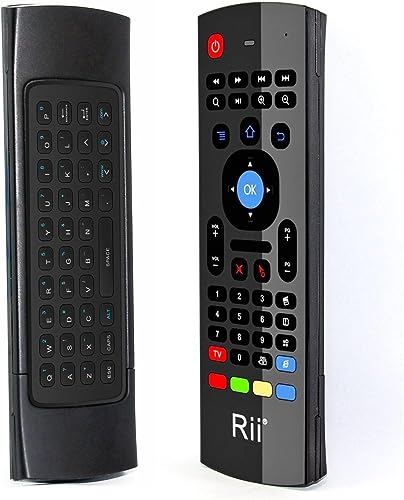
- Air-mouse remote: the Rii MX3 is $12.99, has a full keyboard on the back for the odd password, and the gyro pointer is fine for a web client. Jellyfin 12 also added support for the rewind and fast-forward buttons that most of these remotes have.
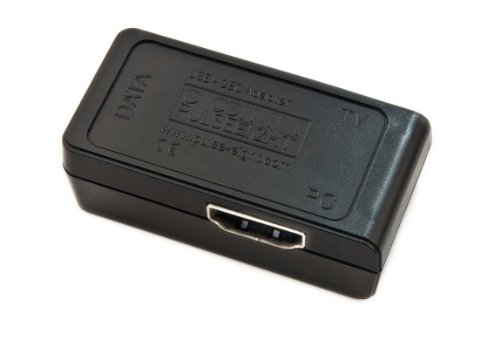
- Use the TV’s own remote: a USB-CEC adapter sits inline on the HDMI cable and turns CEC button presses into keyboard events on the PC. It’s $54.75, which is more than the cheap remote, but it means one remote on the coffee table and no explaining to anyone which one turns the sound up.
- Wake and sleep: set the BIOS to power on after power loss, and let the box run 24/7. At N150 idle power it costs less per month than a coffee.
Things that will bite you on the upgrade
- The version tag.
jellyfin/jellyfin:10.11andjellyfin/jellyfin:12are different majors now. Watchtower-style auto-updaters that tracklatestwill pull 12 whether you took a backup or not. Pin the tag. - Legacy clients stop working. The
/emby/and/mediabrowser/compatibility paths are gone, and the old sign-in method is disabled on existing servers too. If an ancient TV app breaks after the upgrade, that’s why. - Sorting changed. The notes warn that libraries may order slightly differently after the upgrade. It’s in the notes, so don’t blame the scan.
- Posters look smaller. Artwork is no longer stretched past its real size. Low-res posters now sit at their actual pixels. Sharper, but smaller, and it looks broken until you know.
- Subtitle settings moved. They’re per library now; the server-wide options are gone. Set them again on each library after the upgrade.
FAQ
Does taking the TV offline break HDMI features like ARC or CEC? No. ARC, eARC and CEC are HDMI features and work without any network. You lose the TV’s own apps and its firmware updates, and that’s the trade you came for.
Can an N100 transcode 4K to 1080p for a phone on the go? Yes, one or two streams at a time, through Quick Sync. HEVC 10-bit decode and H.264 encode are both in hardware on Alder Lake-N. Software transcoding on those four cores is a different story, so make sure QSV is actually enabled in the dashboard.
Do I have to upgrade to Jellyfin 12 right now? The 12.0 release contains security fixes, so the team recommends upgrading once you’re ready. “Ready” means you have a backup and your third-party plugins have 12-compatible builds.
Is Jellyfin 12 going to break my Android TV client?
The TV layout is unchanged in 12.0 and still runs on the legacy app, so current TV clients keep working. Very old clients that used the removed /emby/ paths or the deprecated sign-in will stop.
Why not just keep the smart TV apps and block the telemetry with Pi-hole? You can try, and Pi-hole on the same mini PC is a good idea regardless. But the standby audio finding involved the TV storing recordings offline and uploading later, and ACR runs on the TV’s own audio processor. DNS blocking reaches neither of those, and an unplugged TV does.
Resources
- Jellyfin: the server releases on GitHub for the full 12.0 changelog
- The LG investigation: Gamers Nexus, “216,000,000 Spy TVs” and Ars Technica on the LAN scanning
- Plex: BleepingComputer’s write-up, September 3
- On this site: the mini PC self-hosting post, RomM on a mini PC, and the Frigate NVR hardware guide if the same box is going to watch your cameras too
Some links above are Amazon affiliate links. If you buy through them, this site earns a small commission at no extra cost to you.
Enjoy the quiet TV.
tb 📺
Last updated: September 2026